WhatsApp Business API Pricing in India: Real Costs in 2026
WhatsApp Business API pricing in India has three layers — Meta message charges, platform fees and GST. See what each costs and how to budget accurately.
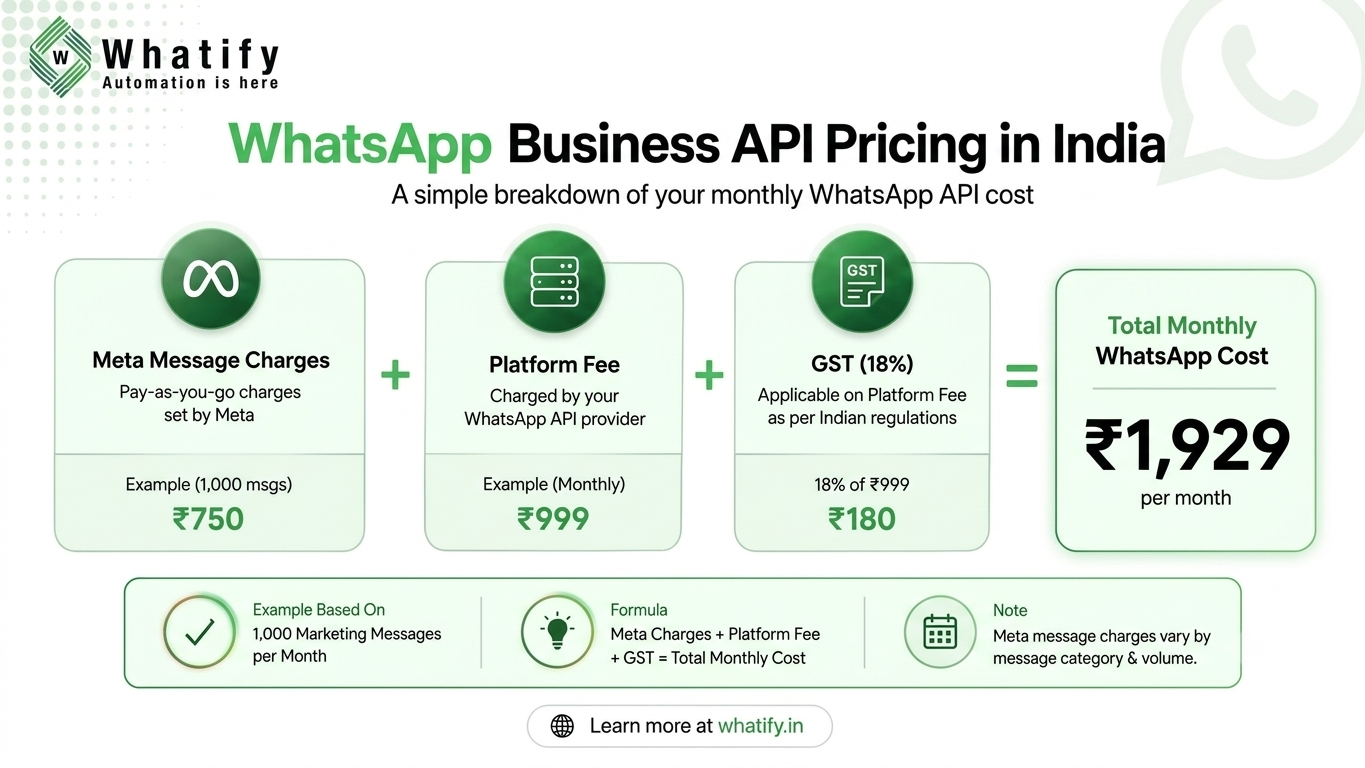
WhatsApp Business API pricing in India has three separate layers: what Meta charges per message, what your platform provider charges as a subscription or markup, and GST. Meta bills per delivered template message based on category — marketing, utility or authentication — and the recipient's country. There is no fee from Meta to simply have API access. Your real monthly cost depends on message volume and message mix, not on the number of contacts you store.
This guide breaks down each layer, flags a pricing change taking effect on 1 October 2026, and shows a worked monthly example.
The three layers of WhatsApp API cost
|
Cost layer |
Who charges it |
How it is billed |
|
Message charges |
Meta |
Per delivered template message, by category and country |
|
Platform fee |
Your provider (BSP) |
Monthly subscription, per-message markup, or both |
|
GST |
Government of India |
Added on Indian invoices as applicable |
Missing any one layer is the most common budgeting mistake. A ₹999 plan is not your bill — it is your entry ticket.
Layer 1: Meta's message charges
Since 1 July 2025, Meta charges per delivered template message rather than per 24-hour conversation. Rates vary by template category and by the recipient's country calling code, and Meta publishes the full rate card in its WhatsApp Business Platform pricing documentation.
The four categories behave very differently:
· Marketing — offers, launches, re-engagement. Always charged, and the most expensive category in India.
· Utility — order confirmations, payment updates, appointment reminders. Much cheaper than marketing.
· Authentication — OTPs and login codes. Lowest cost, charged even inside an open chat window.
· Service — free-form replies inside the 24-hour customer service window. Currently not charged by Meta.
Two rules save real money. First, a customer service window opens for 24 hours each time a user messages you, and non-template replies inside it are currently free. Second, Meta offers volume tiers that lower utility and authentication rates as your monthly volume grows.
Layer 2: The platform fee
Meta does not sell the software layer. You need a provider for the inbox, chatbot builder, campaign manager and integrations — and providers price this differently:
· Subscription only — a flat monthly fee, messages passed through at Meta rates.
· Markup only — no monthly fee, a few paise added to every message.
· Hybrid — a smaller monthly fee plus a per-message margin.
Watch for costs that sit outside the headline price: extra charges per team agent, per additional WhatsApp number, chatbot builder as a paid add-on, or setup and onboarding fees. When you compare providers, compare the total at your expected volume. Our breakdown of WhatsApp API alternatives for Shopify and D2C brands walks through how these add-ons stack up.
Layer 3: GST
Software subscriptions and messaging services are invoiced with GST in India. Budget for it upfront — most published rate cards, including Whatify's, are quoted excluding GST.
What changes on 1 October 2026
Meta has confirmed two pricing changes that directly affect support-heavy Indian businesses:
1. Service messages become chargeable. Free-form replies inside the 24-hour window have been free since November 2024. From 1 October 2026, Meta will charge per service message, at the same rate as utility and authentication messages in each market.
2. Utility templates sent inside an open window become chargeable. These have been free since July 2025.
Separately, from 1 August 2026 Meta charges for its own Meta Business Agent messages on a per-token basis. Meta says it will publish the October rates by 1 September 2026, so verify final numbers against Meta's upcoming pricing updates page before locking your Q4 budget.
Practical takeaway: if a large share of your volume is human support replies, model a higher cost per resolved conversation from October onwards. Deflecting repetitive questions with a chatbot becomes a cost lever, not just a convenience.
A worked monthly example
Assume a growing D2C brand on Whatify's Growth plan sending 10,000 marketing and 5,000 utility messages a month, using Whatify's published wallet rates:
|
Item |
Volume |
Rate |
Cost |
|
Growth plan |
— |
₹2,999/month |
₹2,999 |
|
Marketing messages |
10,000 |
₹0.90 |
₹9,000 |
|
Utility messages |
5,000 |
₹0.50 |
₹2,500 |
|
Subtotal |
|
|
₹14,499 |
|
GST (18%) |
|
|
₹2,610 |
|
Estimated total |
|
|
≈ ₹17,109 |
Rates are from the Whatify pricing page and exclude GST; verify current rates before budgeting. Notice the pattern — messages, not the plan, drive 79% of this bill. That is why message mix matters more than plan choice for most businesses.
Five ways to lower your WhatsApp costs
1. Shift volume from marketing to utility. An order update written as a genuine transactional notification is categorised as utility and costs far less than a promotional blast. Never disguise promotions as utility templates — Meta re-categorises or rejects them.
2. Reply inside the 24-hour window. Responding while the window is open avoids a fresh template charge. This advantage narrows in October 2026, so build the habit around speed, not just savings.
3. Segment before you broadcast. Sending 3,000 relevant messages usually beats 25,000 generic ones on both cost and quality rating.
4. Automate repetitive questions. A chatbot handling order status, pricing and location queries reduces agent hours today and message charges later.
5. Audit your template library quarterly. Unused, duplicate or wrongly categorised templates quietly inflate spend.
Whatify's pricing structure
Whatify uses a plan-plus-wallet model: a monthly platform plan, then pay-as-you-go message costs deducted from a prepaid wallet. Published plans run from Free (₹0) through Starter (₹999), Growth (₹2,999) and Pro (₹9,999) per month, with message rates of ₹0.90 marketing, ₹0.50 utility and ₹0.30 authentication, excluding GST. Wallet minimum recharge is ₹500, and low-balance alerts fire before campaigns pause.
Every plan includes the shared inbox, visual chatbot flow builder, contacts CRM, Shopify and WooCommerce integrations, and API access, plus a 14-day free trial with no card required.
Questions to ask before you sign
· What is the total cost at my realistic monthly volume, including GST?
· Are extra agents, extra numbers or the chatbot builder charged separately?
· How will the provider handle Meta's October 2026 service-message change?
· Can I see message-level spend reporting in the dashboard?
· Is there a setup or onboarding fee?
If you are still deciding whether you need the API at all, compare the free app against the platform in our guide to the differences between WhatsApp Business API and the WhatsApp Business app. If you already know the API is right, the fastest way to get a real cost estimate is to send your first campaign — start a 14-day free trial and watch actual wallet spend against your own volume.
EXTERNAL SOURCES
1. Meta — Pricing on the WhatsApp Business Platform, developer documentation (updated 5 Aug 2026): per-message billing effective 1 July 2025, template categories, customer service window, volume tiers. https://developers.facebook.com/docs/whatsapp/pricing/
2. Meta — Upcoming pricing updates for Meta Business Agent, service and utility messages (updated 1 Jul 2026): 1 August 2026 token-based Meta Business Agent pricing, 1 October 2026 charging of service messages and in-window utility messages, rates to be published by 1 September 2026. https://developers.facebook.com/documentation/business-messaging/whatsapp/pricing/non-template-messages
3. Whatify — pricing page (plans, wallet rates, minimum recharge, GST note). https://whatify.in/pricing
4. Whatify — features page (inclusions verified per plan). https://whatify.in/features
Frequently Asked Questions
There is no fixed price. You pay Meta per delivered template message based on category and country, plus your provider's platform fee, plus GST. On Whatify, plans range from ₹0 to ₹9,999 per month, with messages charged at ₹0.90 marketing, ₹0.50 utility and ₹0.30 authentication, excluding GST.
Meta does not charge a fee for API access itself, and free tiers exist on some platforms, but sending messages costs money. Marketing, utility and authentication template messages are always charged by Meta on delivery. Only the WhatsApp Business app — a different product for small teams — is genuinely free to use.
Marketing templates are promotional and carry the highest per-message rate. Utility templates cover transactional updates such as order confirmations, payment reminders and appointment alerts, and cost significantly less. Categorisation is decided by Meta's template review, not by you, so write utility templates strictly around a specific transaction.
They are free at present. Free-form replies sent inside the 24-hour customer service window have not been charged since November 2024. Meta has confirmed that from 1 October 2026 service messages will be charged per message, at the same rates as utility and authentication messages in each market.
Yes. Indian providers invoice platform fees and message charges with GST as applicable, and most published rate cards exclude it. Add GST to your estimate before approving a budget, and keep tax invoices if your business claims input tax credit.
Often, yes. Move eligible notifications from marketing to utility templates, segment audiences so campaigns reach fewer but more relevant contacts, reply inside the open 24-hour window, and let a chatbot handle repetitive queries. Most cost problems come from message mix and targeting, not from the plan you chose.
Ready to automate your WhatsApp marketing?
Start your 14-day free trial today. No credit card required.
Start Free Trial