WhatsApp Shared Team Inbox: Setup for Small Teams
One WhatsApp number, several agents, no crossed wires. How to structure assignment rules, ownership and response times for a team of three to fifteen people.
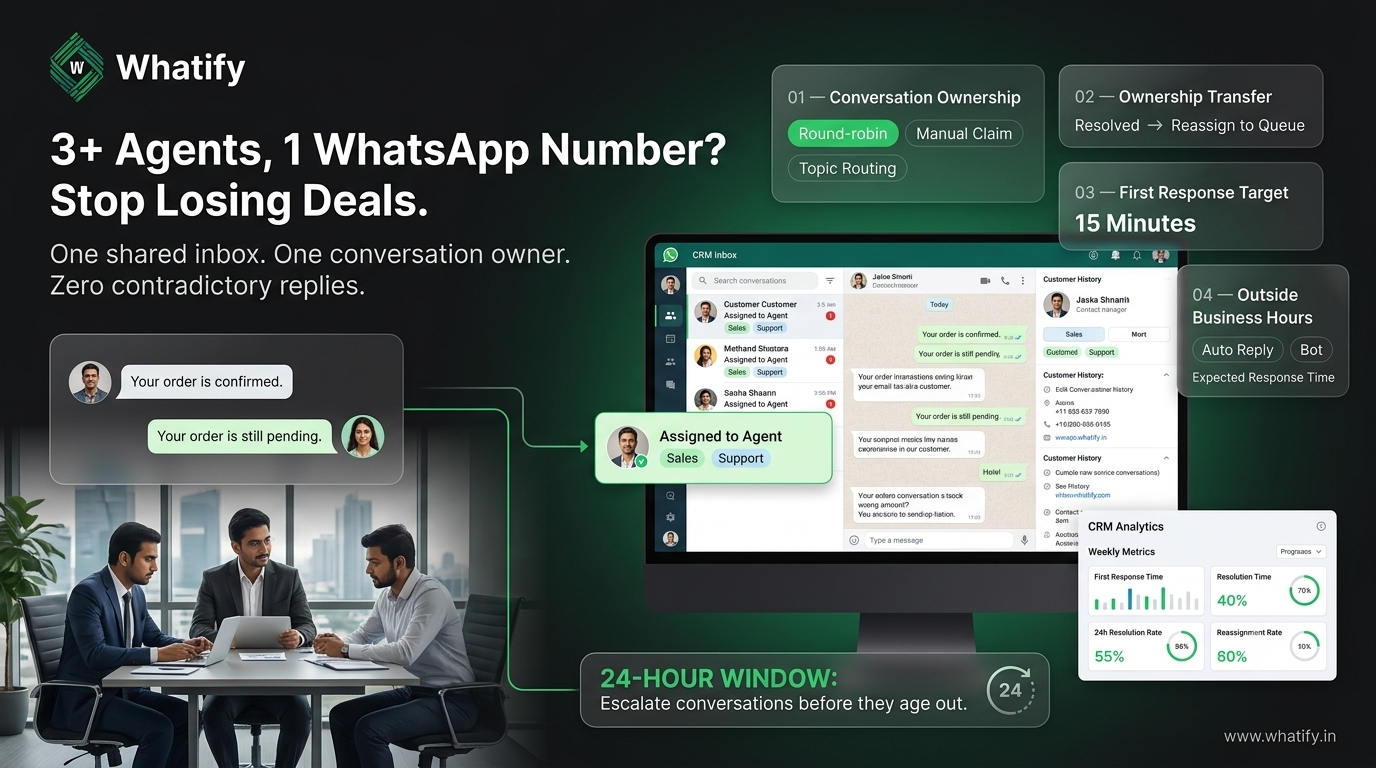
The free WhatsApp Business app allows a limited number of linked devices and no concept of ownership. Two agents open the same chat, both reply, the customer gets contradictory answers. At three or more people, that stops being an annoyance and starts costing deals.
A shared inbox on the API fixes it by making every conversation belong to exactly one person at a time.
The four decisions to make first
Software is the easy part. These four choices determine whether the inbox works.
1. Who owns an unassigned conversation?
Pick one: automatic round-robin, manual claim from a queue, or routing by topic. Round-robin distributes load evenly and suits support. Manual claim suits small sales teams where reps have relationships. Topic routing suits mixed inboxes where sales and support share a number.
2. When does ownership transfer?
Set an explicit rule. A common one: ownership stays with the assigned agent until the conversation is resolved or the agent goes off shift, at which point it returns to the queue. Without a rule, conversations get silently abandoned.
3. What is your first-response target?
Choose a number your team can actually hit — fifteen minutes during business hours is realistic for most Indian SMBs. Publish it internally. An unstated target is not a target.
4. What happens outside business hours?
Either an automated acknowledgement with your hours and expected response time, or a bot that handles common questions. Silence is the worst option, because WhatsApp feels instant to customers.
Structuring the inbox
Labels over folders. Tag conversations by stage — new enquiry, quoted, awaiting payment, resolved — rather than moving them between boxes. Labels survive reassignment.
Separate sales from support at the routing layer, not the number layer. Most SMBs do not need two numbers. They need an opening question that routes the conversation to the right queue.
Use canned replies for the top ten questions. Measure which questions actually recur before writing them, not the ones you assume recur.
Keep customer context visible. An agent picking up a conversation should see previous orders, past tickets and any tags without leaving the chat. Whatify's shared inbox sits alongside its contacts CRM for this reason — see the feature overview.
The 24-hour window changes how you work
Support replies inside the 24-hour customer service window are free of Meta's per-message charges. Once that window closes, reaching the customer again requires a paid template.
This has a practical consequence for inbox discipline: an unanswered conversation that ages past 24 hours becomes more expensive to resume, not just colder. Our guide to WhatsApp cost per message in India explains how the window affects spend.
Build a rule around it. Any conversation approaching the window edge gets escalated, not left in the queue.
Escalation that works
A two-level path is enough for most teams:
|
Level |
Trigger |
Who |
|
1 |
Standard enquiry |
Assigned agent |
|
2 |
No resolution in 4 working hours, or a complaint |
Team lead |
|
3 |
Refund, legal, or public escalation risk |
Owner or manager |
Name the person at each level. "The team lead" is not a name.
Onboarding a new agent
Give them, in this order: the assignment rule, the response-time target, the label taxonomy, the canned replies, and the escalation path. Then let them handle live conversations with a lead reviewing the first day's transcripts. Reading a manual teaches nothing about tone.
Four numbers to watch weekly
· First response time, median rather than average — averages hide outliers
· Resolution time by agent
· Conversations resolved inside the 24-hour window, as a percentage
· Reassignment rate — high reassignment means your routing rule is wrong
If reassignment is above roughly one in five conversations, fix the routing before hiring.
Our guide to WhatsApp campaign metrics covers the outbound side.
When a shared inbox is not the answer
If two agents handle four conversations a day between them, the free Business app is fine. The shared inbox earns its place when volume creates collisions, when you need conversation history that survives staff turnover, or when you are already on the API for broadcasts and want one place for replies.
Whatify includes a shared inbox with agent assignment, labels and contact history on paid plans. Start a 14-day free trial to test it with your own team before committing.
Frequently Asked Questions
Yes, through the WhatsApp Business API with a shared inbox. Each conversation is assigned to one agent at a time, with visible ownership, labels and full history. The free WhatsApp Business app supports only a limited number of linked devices and has no assignment or ownership concept.
Choose one rule and apply it consistently. Round-robin distributes load evenly and suits support teams. Manual claim from a shared queue suits small sales teams where reps hold relationships. Topic-based routing suits a single number serving both sales and support.
Fifteen minutes during business hours is achievable for most Indian SMBs and matches customer expectations of the channel. Track the median rather than the average, since a handful of very slow replies will distort an average and hide a genuine improvement.
Replies inside the 24-hour customer service window are free of Meta's per-message charges. Once it closes, resuming the conversation needs a paid template. An ageing unanswered conversation therefore becomes more expensive as well as colder, so escalate conversations approaching the window edge.
Usually not. Route at the conversation layer with an opening question that sends the enquiry to the right queue. Separate numbers double your setup, split your contact history and confuse customers who saved the wrong one.
Ready to automate your WhatsApp marketing?
Start your 14-day free trial today. No credit card required.
Start Free Trial