WhatsApp Ordering System for Restaurants: Menus, Orders & Bookings
Turn WhatsApp into your restaurant's digital menu, ordering counter & booking desk. See how a WhatsApp ordering system cuts missed orders and no-shows.
Why Restaurants Are Moving Ordering & Bookings to WhatsApp
Picture a Friday dinner rush. The phone is ringing, three tables want the bill, and someone at the counter is trying to explain today's specials to a customer who just walked in. In that chaos, a phone call for a table booking or a takeaway order is easy to miss — and a missed call is often a lost customer who orders from the next restaurant on their list instead.
This is the exact gap a WhatsApp ordering system for restaurants is built to close. Instead of relying on phone lines that can only handle one conversation at a time, WhatsApp lets your restaurant hold dozens of ordering and booking conversations simultaneously, automatically, without adding a single extra staff member.
It also meets customers where they already are. Nearly every diner in India has WhatsApp open on their phone throughout the day — there's no app to download, no account to create, and no learning curve. They message you the same way they'd message a friend, and the system handles menu browsing, order customization, payment, and confirmation from there.
What a WhatsApp Menu for Restaurants Actually Looks Like
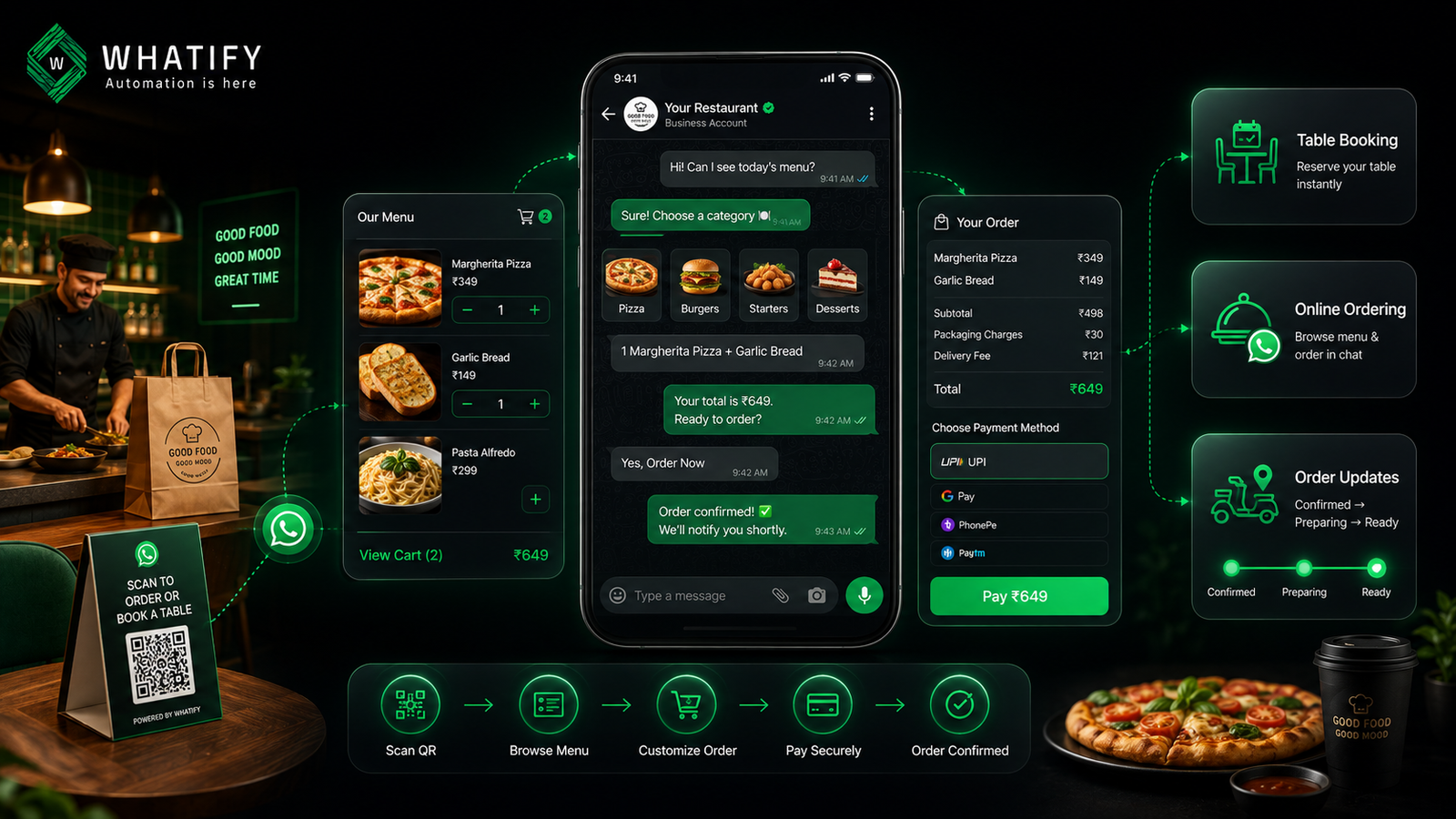
A WhatsApp menu for restaurants replaces the PDF or printed card with an interactive, tap-through experience inside the chat. A customer messages your business number (or scans a table QR code), and instead of a static list, they see:
- Menu categories they can browse (starters, mains, desserts, beverages)
- Photos and prices for each item
- The ability to customize an order (spice level, add-ons, quantity)
- A running cart total before they confirm
Because the menu lives inside the chat, updating it — say, marking a dish "sold out" for the evening or rotating in a weekend special — takes minutes and reaches every customer who messages you next, with no reprinting and no app-store update cycle.
How WhatsApp Food Ordering Actually Works, Step by Step
A WhatsApp food ordering bot typically follows a flow like this:
1. Customer initiates contact — either by messaging your number directly or scanning a table/counter QR code.
2. Menu is presented as an interactive catalog or structured list.
3. Customer builds their order, adding items and any customizations.
4. Order is confirmed with a summary and total, including any delivery or packaging charges.
5. Payment is collected via a UPI or payment-gateway link sent directly in the chat.
6. Order is pushed to your kitchen or POS, so staff see it the same way they'd see a dine-in or aggregator order.
7. Customer receives status updates — order confirmed, being prepared, out for delivery, or ready for pickup.
The entire cycle — browse, order, pay, track — happens without the customer leaving WhatsApp. For repeat customers, reordering a past favorite can be as simple as replying "same as last time."
WhatsApp Table Reservations: Cutting No-Shows Automatically
Booking a table is one of the highest-friction moments in a restaurant's customer journey — and one of the most costly to get wrong. A no-show on a Saturday evening isn't just one lost booking; it's a table your host could have given to someone else.
A WhatsApp table reservation flow typically asks for date, time, party size, and any special occasion, then confirms the booking instantly. From there, automated reminders — sent a day before and a few hours before the reservation — give customers an easy way to confirm or cancel, freeing up the table if plans change.
This single feature is one of the most commonly cited reasons restaurants adopt WhatsApp: unlike a paper reservation book or a missed confirmation call, the reminder goes out automatically, every time, without relying on staff to remember.
The Real Business Case: Beyond "It's Convenient"
Order capture during peak hours. Phone-based ordering breaks down exactly when a restaurant needs it most — during rush. A WhatsApp ordering system can hold unlimited simultaneous conversations, so no order gets lost to a busy line.
Lower commission dependence. Aggregator platforms typically charge 20–30% commission per order. Every order a restaurant can move to a direct WhatsApp channel — especially from repeat, loyal customers — is an order where the restaurant keeps significantly more of the revenue.
Customer data ownership. When orders flow through an aggregator, the restaurant rarely gets the customer's name, number, or order history. A direct WhatsApp channel means the restaurant builds its own customer list — useful for loyalty offers, birthday promotions, and win-back campaigns.
Operational consistency. Orders and bookings taken over WhatsApp can sync into the same kitchen queue as dine-in and aggregator orders, reducing the miscommunication that happens when staff juggle four different channels manually.
📊 Stat box: Industry reports on WhatsApp ordering adoption suggest restaurants can see online order volumes rise by up to 30% after launching a WhatsApp ordering channel, alongside a meaningful drop in abandoned orders compared to app-based checkout. These figures vary by source, restaurant format, and city — treat them as directional, and track your own before/after numbers once you launch.
What to Look for in a WhatsApp Ordering Platform
Not every WhatsApp Business API provider is built with restaurant operations in mind. A few things matter more than a long feature list:
- Flat, predictable pricing. Per-message or per-agent markups compound quickly for a restaurant sending order confirmations, reminders, and status updates all day.
- Unlimited agents. During service hours, you may need multiple staff members — a host, an order desk, a manager — accessing the same WhatsApp inbox without paying per seat.
- Catalog and cart support. The platform should let customers browse, customize, and check out without leaving the chat.
- A no-code flow builder. Reservation and order flows should be editable by a manager, not locked behind a developer request.
- POS or spreadsheet-friendly sync. Even a lightweight order log matters if a full POS integration isn't in place yet.
Where Whatify Fits
Whatify is built around flat wallet pricing — no per-message markup and no per-agent fees — which matters for a restaurant sending high message volumes across orders, reservations, and reminders throughout the day. Every plan includes unlimited agents, so your host stand, order desk, and manager can all work from the same WhatsApp inbox without extra seat costs. Restaurants can start with a 14-day free trial and get a working menu-and-booking flow live at a starting price of ₹999/month — without needing an in-house developer to set it up. You can see how this applies to your restaurant .
8. Comparison Table
Note: Competitor pricing changes frequently and figures below are approximate as of mid-2026 based on publicly available information. Always verify current pricing directly on each provider's website before publishing or quoting to prospects.
|
Feature |
Whatify |
Wati |
AiSensy |
Interakt |
DoubleTick |
|
Starting price (approx.) |
₹999/month |
~₹2,499–2,999/month |
~₹1,500–1,999/month |
~₹2,499/month |
~₹2,000-3000/month (annual only) |
|
Per-message markup |
None (flat wallet pricing) |
Often added on top |
Varies by plan |
Active-contact tiers |
Meta charges separate |
|
Agent limit |
Unlimited, all plans |
Limited on lower tiers |
Unlimited on some plans |
Unlimited on some plans |
Capped (e.g., ~10 on entry tiers) |
|
Free trial |
14 days |
~7 days |
14 days (some free-forever tier) |
14 days |
No free trial reported |
|
Catalog / ordering support |
Yes |
Yes (plan-dependent) |
Yes |
Strong (Shopify-oriented) |
Yes |
|
No-code flow builder |
Yes |
Basic on lower tiers |
Yes |
Yes |
Yes |
|
Best suited for |
Restaurants & SMBs wanting predictable costs |
Mid-market support teams |
Broadcast/ads-heavy marketing |
Shopify-style D2C order flows |
Chatbot-heavy automation |
Conclusion
For a restaurant, WhatsApp isn't just another marketing channel — it's a working replacement for the parts of the business that quietly leak revenue: the phone call that goes unanswered during rush, the table that no-shows because no one sent a reminder, and the order that goes to a competitor because checkout took too long. A WhatsApp ordering system brings your menu, your ordering counter, and your booking desk into one chat your customers already have open. The result isn't just convenience — it's fewer missed orders, fewer empty tables, and a direct relationship with customers that doesn't run through a 20–30% commission.
Frequently Asked Questions
Yes. Customers can message your restaurant's WhatsApp number or scan a table QR code, browse an interactive menu, customize their order, pay through an in-chat payment link, and receive order status updates — all without leaving the chat or downloading an app.
No. WhatsApp ordering sits on top of your existing POS as a customer-facing ordering and communication layer. Orders taken over WhatsApp still need to reach your kitchen, ideally synced into the same order queue as dine-in and aggregator orders.
Not necessarily. Platforms with a no-code flow builder let a restaurant manager set up menu, ordering, and reservation flows directly, without engineering support.
Yes. A reservation flow can collect date, time, party size, and special requests, confirm the booking instantly, and send automated reminders before the reservation to reduce no-shows.
It can meaningfully reduce commission costs on orders from repeat, loyal customers who are happy to order directly. Aggregators still play a role in bringing in new customer discovery, so most restaurants run both channels together rather than replacing one with the other.
Ready to automate your WhatsApp marketing?
Start your 14-day free trial today. No credit card required.
Start Free Trial