WhatsApp for Clinics: Cutting Appointment No-Shows
A reminder cascade that lets patients confirm, reschedule or cancel in one tap — plus the message timings, the privacy rules, and what to send after the visit.
A no-show costs a clinic the full value of the slot. The patient does not pay, the slot cannot be resold at short notice, and the doctor's time is gone. Most clinics accept a certain rate of it as unavoidable.
Much of it is not unavoidable. A large share of no-shows are people who forgot, or who could not attend and had no easy way to say so at 9pm the night before. Both are solvable with messaging.
Why WhatsApp rather than SMS or a phone call
Reception staff calling to confirm appointments is expensive and reaches perhaps half of patients. SMS is one-way — a patient who cannot attend has no way to respond usefully.
WhatsApp allows a reply. That single difference is what converts a would-be no-show into a rescheduled appointment, which is a slot you can refill.
The reminder cascade
Three messages. Each has a distinct job.
Message 1 — at booking, immediately
Confirms the appointment in writing. Doctor, date, time, clinic address. Include a map link. This message alone reduces the "I thought it was Thursday" category of no-show.
Message 2 — 24 hours before
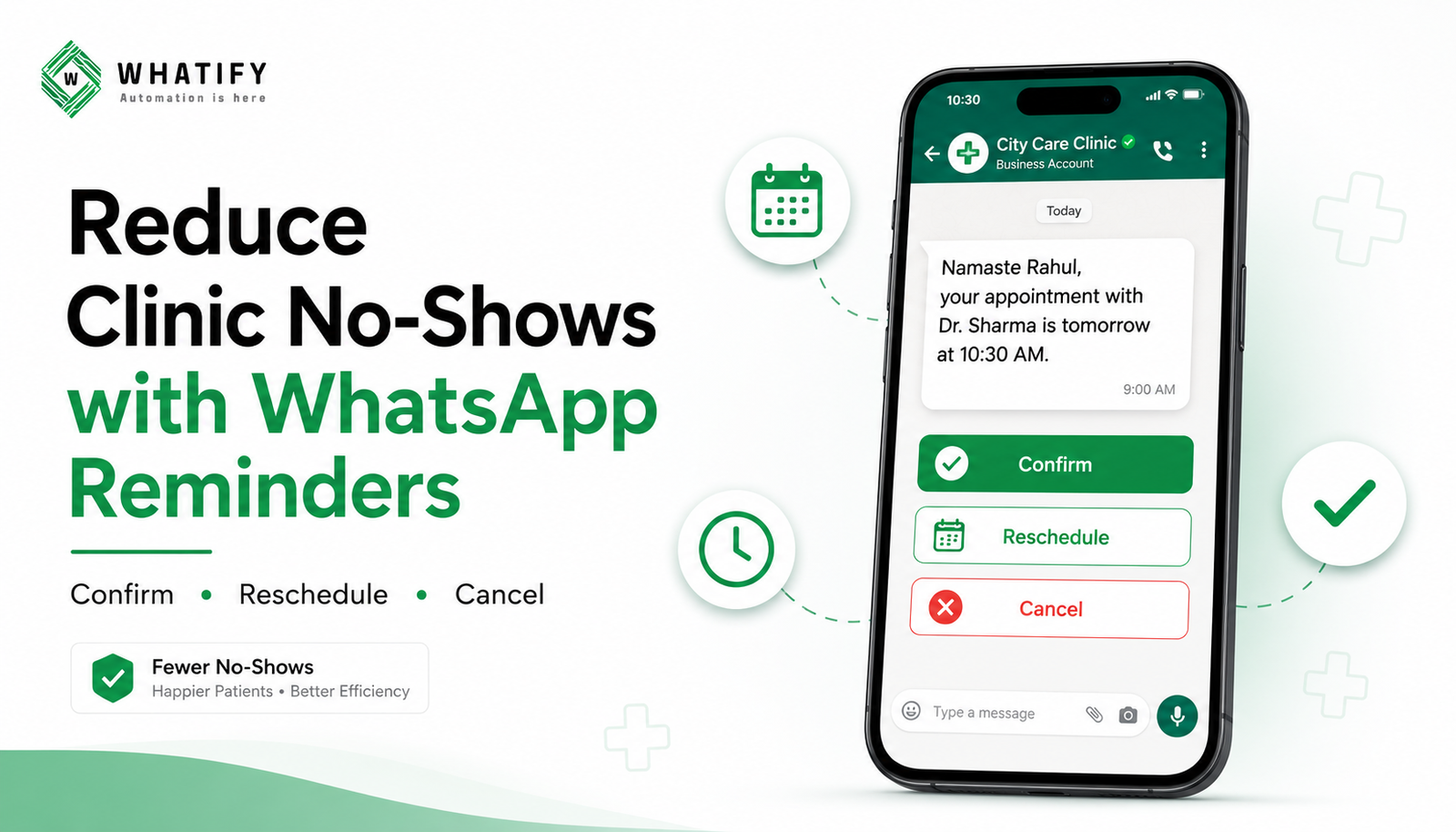
The workhorse. Three buttons: Confirm, Reschedule, Cancel.
Namaste {{1}}, this is a reminder of your appointment with {{2}} tomorrow at {{3}}.
[Confirm] [Reschedule] [Cancel]
Message 3 — two to three hours before
Short. Time and address only, plus anything the patient must bring or avoid — fasting for a blood test, previous reports, a referral letter.
Handle the responses properly
The buttons are only worth adding if the responses are actioned.
|
Response |
Action |
|
Confirm |
Tag confirmed; no further messages |
|
Reschedule |
Offer next available slots as buttons; release the original slot |
|
Cancel |
Release the slot immediately; add to a waitlist offer if you keep one |
|
No response |
Optional reception call, prioritised over confirmed patients |
The release step is the commercially important one. A slot freed at 6pm the previous evening can be offered to a waitlist patient. A slot lost at 10am cannot.
What to send after the visit
Follow-up reminders. Review in two weeks, dressing change in three days, next vaccination in six months. Clinics lose enormous amounts of recurring revenue simply by not reminding people.
Report ready notification. For diagnostics, a message when results are available beats a patient phoning reception three times.
Feedback request. One question, a few days later. Route unhappy responses to a human immediately rather than to a public review.
Privacy: the part clinics must get right
Health information is sensitive and requires more care than retail messaging.
· Do not put clinical details in a reminder. "Your appointment with Dr Sharma" is fine. Naming the condition, the test or the department is not — messages appear on lock screens and phones are shared.
· Never request sensitive data by message. No ID numbers, no card details, no medical history collection over chat. Meta prohibits requesting sensitive information in templates, and it is poor practice regardless.
· Take explicit opt-in at registration, separate from your general consent form, and store when and how it was given. Our guide to DPDP consent records covers what to keep.
· Keep marketing separate from clinical communication. A patient consenting to appointment reminders has not consented to promotional offers on health packages.
Costs
Appointment reminders are utility templates, which cost less than marketing templates. A clinic running 30 appointments a day with a three-message cascade sends roughly 90 templates daily. Work the arithmetic against your own volume using our cost per message guide before enabling everything.
Two ways to control spend: drop message 3 for repeat patients who reliably attend, and skip message 2 for appointments booked the same day.
Measuring whether it worked
Record your no-show rate for the four weeks before you start. Then track:
· No-show rate, weekly
· Confirm-button rate
· Reschedule rate — a rising number here is good, not bad
· Slots refilled after a cancellation
Do not trust vendor claims about typical improvement, including ranges you will find widely quoted online. Measure your own baseline and compare against it.
Setting it up
Most clinics do this in three steps: connect your appointment system or a Google Sheet as the source of truth, build the three templates and get them approved, then set the send triggers relative to appointment time.
Whatify supports Google Sheets and webhook-based triggers, and our healthcare use case page covers the wider workflow. Start a 14-day free trial to test the cascade on a single doctor's diary before rolling it out.
EXTERNAL SOURCES
1. Meta — WhatsApp Business Messaging Policy: rules on requesting sensitive information and handling health-related content. https://business.whatsapp.com/policy
2. Meta — Message template guidelines: utility category criteria for appointment reminders. https://developers.facebook.com/docs/whatsapp/business-management-api/message-templates/
Frequently Asked Questions
They address the two main causes. A written confirmation prevents patients misremembering the date, and a reminder with Confirm, Reschedule and Cancel buttons gives patients who cannot attend an easy way to say so in advance — turning a lost slot into one you can refill.
Three messages work well: a written confirmation at the time of booking, a reminder twenty-four hours before with response buttons, and a short message two to three hours before with the time, address and anything the patient must bring or avoid.
: It is, provided you keep clinical detail out of the message. Name the doctor, date and time, but not the condition, test or department, since messages appear on lock screens and phones are often shared. Never request sensitive information such as ID or payment details by message.
: Yes. Take explicit opt-in at registration, separate from your general consent form, and record when and how it was given. Keep appointment reminders and promotional messages as distinct consents — agreeing to reminders is not agreement to receive health package offers.
Reminders are utility templates, charged at the lower utility rate rather than the marketing rate. Cost scales with appointment volume and how many messages are in your cascade, so estimate against your daily appointments before enabling every step.
Ready to automate your WhatsApp marketing?
Start your 14-day free trial today. No credit card required.
Start Free Trial