WhatsApp CRM Explained: Features, Benefits & Top Tools Compared 2026
WhatsApp CRM software explained: what it does, must-have features, and how Whatify, Wati, AiSensy, Interakt & DoubleTick compare on pricing and agents.
What Is WhatsApp CRM Software?
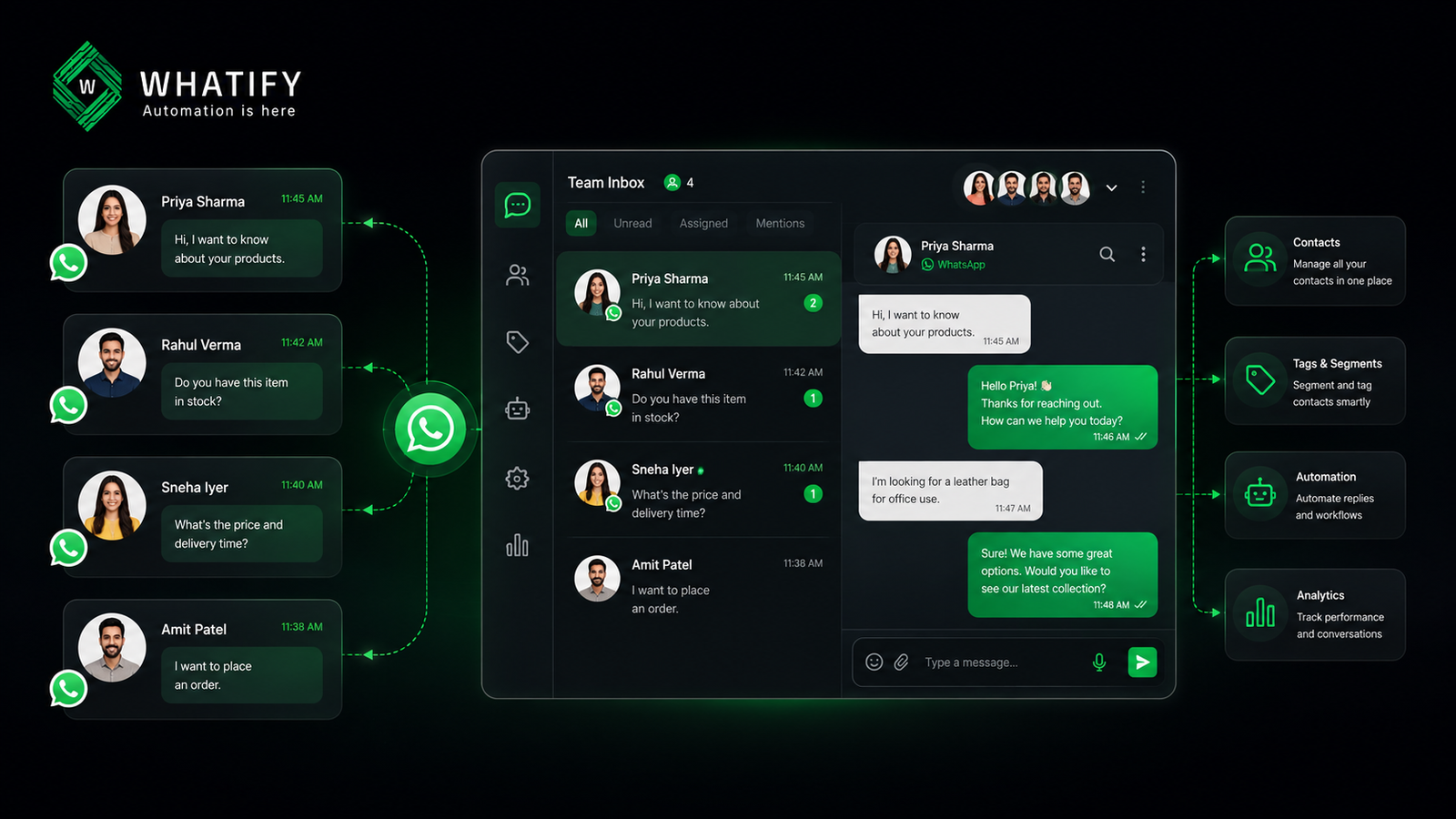
WhatsApp CRM software sits between the official WhatsApp Business API (WABA) and your team. It pulls every customer conversation into one shared dashboard, stores contact details and chat history against each customer profile, and lets multiple agents reply from a single verified WhatsApp number without stepping on each other's conversations.
Think of it as the difference between checking messages on your personal phone versus running a proper helpdesk. The free WhatsApp Business App works fine for one person handling a handful of chats. Once a team is involved — sales, support, and marketing all touching the same WhatsApp number — a WhatsApp CRM becomes necessary to keep contacts organized and conversations from getting lost.
How WhatsApp CRM Software Works
A WhatsApp CRM platform typically connects to Meta's WhatsApp Cloud API through a Business Solution Provider (BSP). Once connected, the platform gives you:
1. A shared team inbox — all incoming and outgoing messages appear in one place, assignable to different agents.
2. Contact and conversation storage — customer phone numbers, names, tags, custom fields, and full chat history live against each profile.
3. Broadcast and campaign tools — send templated marketing or utility messages to segmented contact lists.
4. Automation — chatbots, auto-replies, and keyword-based workflows that qualify or route leads before a human ever joins the chat.
5. Integrations — connections to Shopify, Zoho, HubSpot, Google Sheets, and similar tools so WhatsApp data doesn't sit in a silo.
The "CRM" label is doing real work here, but it's worth being precise: contact and conversation management is not the same as a full sales CRM with pipeline stages, deal values, and win/loss tracking. Most WhatsApp CRM tools — including the ones compared below — are conversation-and-contact platforms rather than end-to-end sales CRMs. If a business needs deep pipeline management, it typically pairs a WhatsApp CRM with a dedicated sales CRM via integration.
Core Features to Look For in a WhatsApp CRM
Not every "WhatsApp CRM" on the market offers the same depth. When evaluating platforms, check for:
- Contact management: tags, custom attributes, segmentation, and searchable chat history
- Team inbox: chat assignment, internal notes, and role-based access
- Agent limits: some platforms cap agents per plan; others include unlimited agents
- Message pricing model: flat subscription vs. per-message markup on top of Meta's own rates
- Automation depth: keyword triggers vs. full no-code chatbot builders
- Free trial: whether you can test the platform before committing
- Verification support: help with WhatsApp Blue Tick (formerly Green Tick) applications
Why Indian SMBs and D2C Brands Need a WhatsApp CRM
WhatsApp is where Indian customers already are — for order updates, appointment reminders, and increasingly, for browsing and buying. A WhatsApp CRM turns that channel from a single inbox into a structured, team-manageable system:
- E-commerce: recover abandoned carts, send order and shipping updates, and route product queries to the right agent.
- Real estate: capture property inquiries from ads, tag leads by budget or location, and follow up automatically.
- Healthcare: send appointment reminders and manage patient queries without mixing them into a personal phone.
- EdTech and services: qualify leads via chatbot before a counselor spends time on the call.
Top WhatsApp CRM Tools Compared (2026)
Here's how five widely used platforms in the Indian market — Whatify, Wati, AiSensy, Interakt, and DoubleTick — compare on the things that matter most for CRM-style use: contact management, agent access, and total cost.
A quick honesty note before the table: pricing on WhatsApp API platforms changes often, and different sources (vendor pages, review sites, app stores) sometimes list different numbers for the same plan. Treat the figures below as directional and always confirm current pricing on each vendor's site before making a decision.
Wati offers a genuine shared-inbox CRM experience with contact tagging, custom fields, and conversation history, positioning it well for support-heavy teams. But its Growth plan hard-caps you at three users with no way to add more, and Pro/Business plans add extra seats at roughly $24 each on Pro and about $69 each on Business. On top of the subscription, Wati applies a markup on Meta's conversation rates — roughly a 20% increase on marketing conversations, plus separate charges for automation triggers and Shopify integration.
AiSensy leads with a genuinely usable free tier — the Free Forever plan includes API access, a live chat dashboard, contact management, up to 10 tags, and 5 custom attributes, though Meta's per-message fees apply separately. Paid plans start at roughly $45/month (Basic) and around $99/month (Pro), and agent access is generous on paper, but extra agents beyond the included five cost roughly ₹750/month each, and the chatbot builder is a paid add-on around ₹2,000–2,500/month.
Interakt markets "unlimited agents" on its Marketing & Support Hub plans, which is a real differentiator for growing support teams. The catch: its Sales CRM — the part built for lead tracking and pipeline management — is a separate product with only a single Starter plan, requiring its own subscription if you want both marketing and sales-CRM capability together. AI Agents are a premium add-on starting around ₹10,000/month, and Meta's conversation fees still apply on top.
DoubleTick bundles contact management, CRM integrations, and AI-assisted cart building into a mobile-friendly app, but two things stand out for CRM buyers: all plans require an annual commitment with no monthly option and no free trial, and features like roles/permissions, developer API access, and reporting are gated behind the Pro tier rather than included in Starter. Agent pricing beyond the included five runs roughly ₹500/month per additional seat on some plans, which adds up quickly for growing teams.
Whatify takes a different approach on both fronts. Instead of per-agent fees or message markups layered on top of a base price, Whatify uses flat wallet pricing — unlimited agents come included on every plan starting at ₹999/month, and there's no per-message markup added on top of Meta's own rates. A 14-day free trial lets teams test contact management, tagging, and the shared inbox before committing, without the annual lock-in some competitors require.
How to Choose the Right WhatsApp CRM
- Support-heavy team with many agents? Prioritize platforms with no per-agent fees so headcount growth doesn't inflate your bill.
- Running frequent broadcast campaigns? Check the message markup carefully — small percentages compound fast at volume.
- Want to test before committing? Confirm free trial length and whether the platform requires an annual contract.
- Need real sales pipeline tracking, not just contact tags? Plan to pair your WhatsApp CRM with a dedicated sales CRM via integration, since none of the platforms above fully replace one.
8. Comparison Table
|
Platform |
Entry Price (approx.) |
Agents Included |
Message Markup on Meta Rates |
Free Trial |
CRM Depth |
|
Whatify |
₹999/month flat |
Unlimited, all plans |
None |
14 days |
Contact tags, custom fields, shared inbox |
|
Wati |
~$59/month (Growth) |
3 (no add-ons on Growth) |
~20% on conversations |
7 days |
Contacts, tags, conversation history — no pipeline |
|
AiSensy |
Free tier; ~$45–99/month paid |
1 owner + 5 agents (extra ~₹750/agent) |
Meta rate passthrough |
14 days (paid plans) |
Contact management, tags, custom attributes |
|
Interakt |
₹999/month (Instagram-focused Starter) |
Unlimited (Marketing Hub only) |
Meta rate passthrough |
Varies by plan |
Basic CRM; full Sales CRM is a separate product |
|
DoubleTick |
~$141.58/month, billed annually |
5 (extra ~₹500/agent) |
Meta rate passthrough |
None |
Contact/CRM integration, AI cart tools |
Pricing figures are approximate and change frequently across vendors — always verify current rates on the official pricing page before publishing or quoting to a prospect.
Conclusion
Choosing a WhatsApp CRM comes down to matching the platform's pricing model and CRM depth to how your team actually works. If agent count will grow, per-seat fees can quietly become your biggest cost line. If you run frequent campaigns, message markups matter more than the sticker price. And if your team needs genuine pipeline tracking rather than contact tags, plan for an integration rather than expecting any single WhatsApp CRM tool to do it all. Whatify's flat wallet pricing, unlimited agents, and 14-day trial make it a straightforward starting point for teams that want predictable costs without the per-agent or per-message surprises common across the category.
Frequently Asked Questions
No. Most WhatsApp CRM tools focus on contact management, tagging, and conversation history rather than deal pipelines or sales stages. For full pipeline tracking, businesses typically integrate their WhatsApp CRM with a dedicated sales CRM.
Yes. WhatsApp CRM platforms connect to the official WhatsApp Business API through a Business Solution Provider — they don't work with the free WhatsApp Business App, which is built for single-user use.
Often, yes. Beyond the subscription fee, watch for per-agent charges, markups on Meta's message rates, automation-trigger top-ups, and paid add-ons like chatbot builders or third-party integrations.
It depends on the platform. Some cap agents per plan and charge per additional seat; others, including Whatify and Interakt's Marketing Hub, include unlimited agents on their standard plans.
Most platforms offer a free trial, though the length varies — commonly 7 to 14 days. Some platforms require an annual commitment with no trial at all, so confirm this before signing up.
Ready to automate your WhatsApp marketing?
Start your 14-day free trial today. No credit card required.
Start Free Trial