6 WhatsApp Chatbot Flows That Earn Their Keep
Skip the generic FAQ bot. Six chatbot flows with triggers, branching logic and message copy — lead qualification, order status, booking, and three more that pay back.
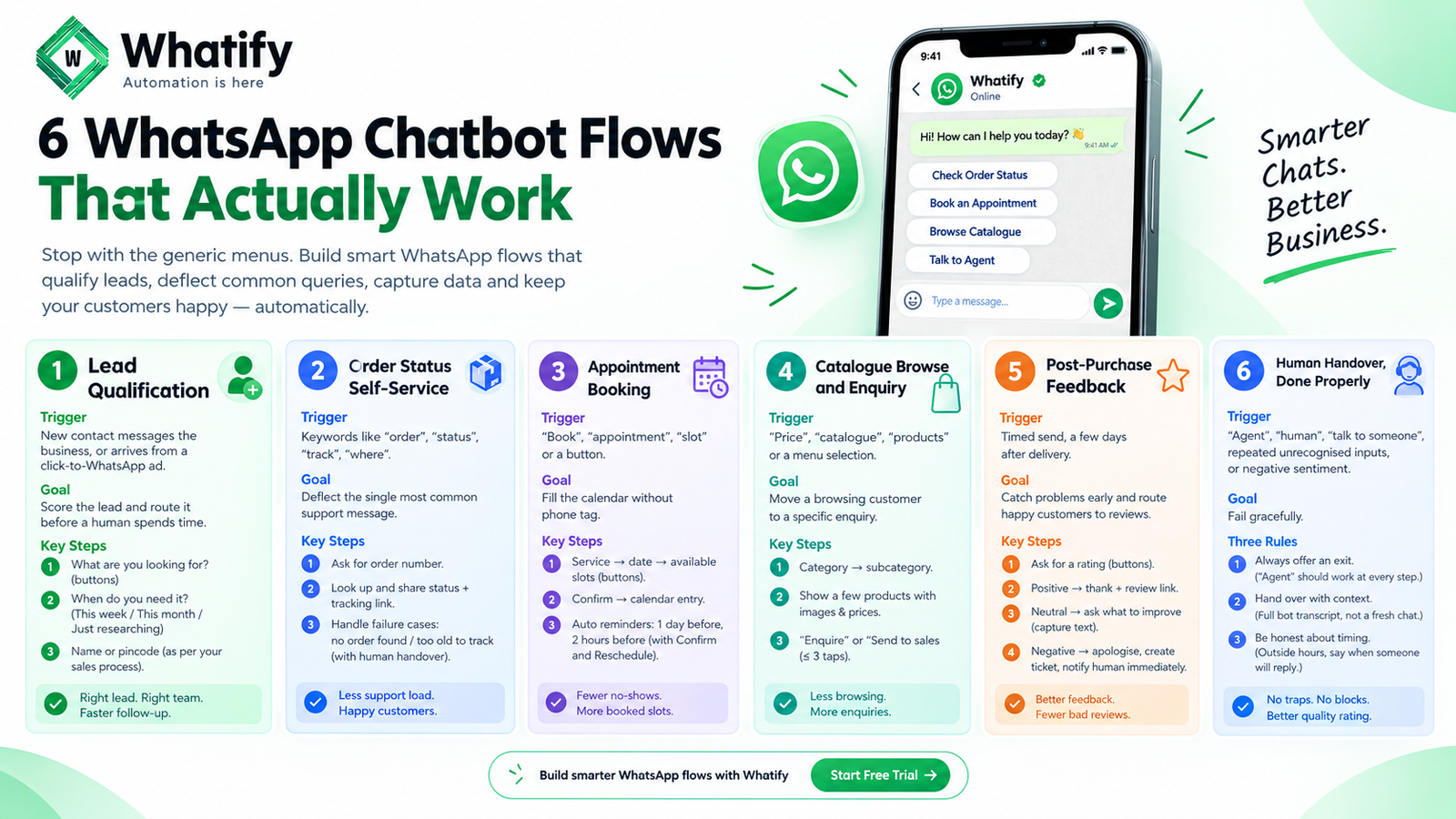
Most WhatsApp chatbots are a menu of five FAQs that customers ignore before typing "talk to agent". The flows below are different because each one either qualifies a lead, deflects a repetitive ticket, or captures data you would otherwise chase manually.
If you have not built a bot before, our guide to building a WhatsApp chatbot without coding covers the builder mechanics. This article covers what to build in it.
Flow 1: Lead qualification
Trigger: New contact messages the business, or arrives from a click-to-WhatsApp ad.
Goal: Score the lead and route it before a human spends time.
Ask three questions, no more:
1. What are you looking for? (buttons: the two or three things you actually sell)
2. When do you need it? (This week / This month / Just researching)
3. Ask for a name or a pincode, whichever your sales process needs.
Routing: "This week" goes straight to a sales agent with the answers attached. "Just researching" gets a resource and a tag for a follow-up sequence later. Anyone who selects something you do not offer gets an honest answer and exits — that is a saved conversation, not a lost one.
The value is not automation. It is that a rep opens the chat already knowing what the person wants.
Flow 2: Order status self-service
Trigger: Keywords such as "order", "status", "track", "where".
Goal: Deflect the single most common support message.
Ask for the order number, look it up, return the status and the tracking link. Handle the two failure cases explicitly: no order found, and an order too old to track. Both should offer human handover rather than looping.
For most retailers this deflects a large share of inbound support volume, and it works at 2am.
Flow 3: Appointment booking
Trigger: "Book", "appointment", "slot", or a button on your welcome message.
Goal: Fill the calendar without phone tag.
Service → date → available slots as buttons → confirm → calendar entry created. Then schedule reminders automatically: one the day before, one a couple of hours before, each with Confirm and Reschedule buttons.
The reminder cascade is the part that pays. A customer who reschedules two hours ahead frees a slot you can refill. A no-show is revenue that cannot be recovered.
Flow 4: Catalogue browse and enquiry
Trigger: "Price", "catalogue", "products", or a menu selection.
Goal: Move a browsing customer to a specific enquiry.
Category buttons → subcategory → a small set of products with images and prices → "Enquire" or "Send to sales".
Keep it shallow. Three taps maximum before a human or a link. A bot is a poor substitute for a product page, so use it to narrow intent and then hand over.
Flow 5: Post-purchase feedback
Trigger: Timed send, a few days after delivery.
Goal: Catch problems before they become public reviews, and route happy customers to public reviews.
Ask one rating question with buttons. Then branch:
· Positive → thank them and ask for a review, with the link
· Neutral → ask what would have improved it, capture the free-text answer
· Negative → apologise, create a ticket, notify a human immediately
The negative branch is the one that matters. A complaint answered privately within the hour rarely becomes a one-star review.
Note that a rating request usually falls under the marketing category depending on content — check before assuming utility pricing. See template categories and pricing.
Flow 6: Human handover, done properly
Trigger: "Agent", "human", "talk to someone", repeated unrecognised inputs, or any negative sentiment.
Goal: Fail gracefully.
Three rules:
4. Always offer an exit. Every bot step should accept "agent" as an input.
5. Hand over with context. The agent sees the full bot transcript, not a fresh chat.
6. Be honest about timing. Outside business hours, say when someone will reply rather than implying an agent is coming.
A bot that traps people generates blocks, and blocks damage your quality rating. Our quality rating recovery playbook explains why that matters more than the tickets deflected.
Build order
Start with whichever of these you currently do manually most often. For retailers that is usually order status. For services businesses it is booking. For B2B it is lead qualification.
Build one flow, run it for two weeks, read the transcripts. The transcripts will tell you what to build next more reliably than any framework.
Three things to avoid
· Deep menu trees. Every extra level loses people.
· Open-ended questions early. Buttons produce clean data; free text produces "hi" and "?".
· Bots that cannot say "I don't know". An honest handover beats a confident wrong answer.
Whatify's visual flow builder supports branching, conditions, keyword triggers and agent handover without code. See how the builder works or start a 14-day free trial.
EXTERNAL SOURCES
1. Meta — Interactive messages, Cloud API documentation: button and list message structure and limits used in these flows. https://developers.facebook.com/docs/whatsapp/cloud-api/guides/send-message-templates
2. Meta — Customer service windows: why inbound-triggered bot replies are not charged. https://developers.facebook.com/docs/whatsapp/cloud-api/guides/send-messages
Frequently Asked Questions
Three at most — what they want, when they need it, and one identifying detail such as a name or pincode. Use buttons rather than free text so answers are structured. Longer sequences increase drop-off without materially improving lead quality.
Accept "agent" or "human" as valid input at every step, hand over with the full transcript so the customer does not repeat themselves, and state honest response times outside business hours. Bots that trap people generate blocks, and blocks damage your quality rating.
Three at most — what they want, when they need it, and one identifying detail such as a name or pincode. Use buttons rather than free text so answers are structured. Longer sequences increase drop-off without materially improving lead quality.
Yes. A service-then-date-then-slot flow using buttons can create the calendar entry and schedule automated reminders with confirm and reschedule options. The reminder step is where most of the value sits, because a rescheduled slot can be refilled and a no-show cannot.
Replies inside the 24-hour customer service window are free of Meta's per-message charges, so a bot responding to an inbound message usually costs nothing. Business-initiated messages such as scheduled reminders or feedback requests are template messages and are charged by category.
Ready to automate your WhatsApp marketing?
Start your 14-day free trial today. No credit card required.
Start Free Trial