WhatsApp Messaging Limits Explained: From 250 to Unlimited
WhatsApp caps how many people you can message each day, starting at 250. Here is the full tier ladder, how upgrades are triggered, and how to move up faster.
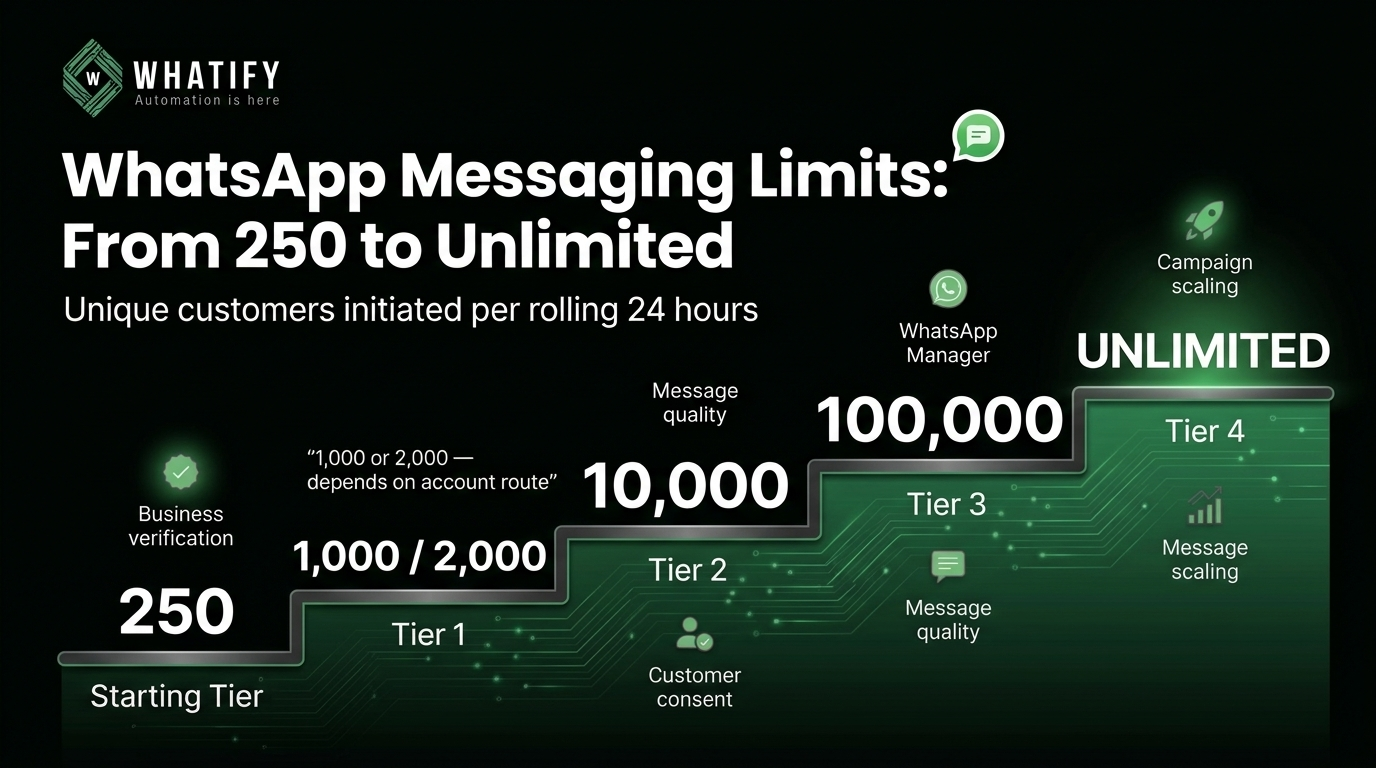
WhatsApp limits how many unique customers your business can start conversations with in a rolling 24-hour period. New accounts begin at 250. From there the ladder runs to 1,000 or 2,000 depending on your route, then 10,000, then 100,000, then unlimited.
The limit counts unique recipients you initiate contact with — not total messages sent. Replying to someone who messaged you first does not consume your limit, and sending three messages to the same person in a day counts once.
The tier ladder
|
Tier |
Unique customers you can message per 24 hours |
|
Starting tier |
250 |
|
Tier 1 |
1,000 or 2,000 — see note below |
|
Tier 2 |
10,000 |
|
Tier 3 |
100,000 |
|
Tier 4 |
Unlimited |
A note on the first step. Public sources disagree here. Several established platform documentation pages state the first step above 250 is 2,000; others state 1,000. Meta's own dashboard is the authority for your specific account — check the messaging limit shown against your phone number in WhatsApp Manager rather than relying on any third-party figure, including this one.
Two ways out of the 250 tier
This is the part most guides compress into a single sentence, and it costs businesses weeks.
Route 1 — Business verification. Complete Meta Business Verification for your portfolio. This is a documentation process: legal entity name, registered address, and proof such as GST registration, certificate of incorporation or a utility bill in the business name. Verified businesses move up without needing to demonstrate sending volume first.
Route 2 — Demonstrated quality sending. Send to a threshold of unique customers within a rolling 30-day period while maintaining high template quality. This route suits businesses that already have consented contacts and want to scale before completing verification paperwork.
Meta also operates an Alternate Path Program for businesses that reach a meaningful conversation volume — reported at around 1,000 conversations in 30 days — allowing them to scale past the starting tier without the traditional verification route. Availability varies by account.
Business verification is also a prerequisite for the verified badge. If that is on your roadmap, the two processes overlap — our guide to WhatsApp green tick verification covers the documentation in detail.
How automatic upgrades actually work
Meta evaluates your account for an upgrade every six hours. Two conditions must both be true:
1. Quality is Medium or High across all phone numbers in the portfolio.
2. You have used at least 50% of your current limit within a rolling seven-day window.
The second condition is where businesses stall indefinitely. An account sitting at 250 that sends 60 messages a day will never upgrade, no matter how long it waits or how perfect its quality rating is. Meta has no evidence you need more capacity.
If you are stuck, the fix is not patience. It is sending closer to your ceiling — to genuinely consented, genuinely engaged contacts.
What changed with portfolio-level limits
Since October 2025, messaging limits apply at the business portfolio level rather than per phone number. All numbers within a Business Manager portfolio share the highest limit achieved by any number in it.
This is good news operationally. Adding a second number for a new city, franchise or product line no longer means starting that number at 250. It inherits the portfolio's limit. It also means older articles describing per-number tier climbing are out of date.
The corollary: quality problems on one number affect the portfolio's standing. Numbers are no longer isolated from each other.
What happens when you hit the limit
Sending stops for new conversations until the rolling 24-hour window clears. Messages to customers who contacted you first still go through, because those do not count against the limit.
Practically, this means a campaign scheduled to 8,000 contacts on a 2,000 limit will deliver to 2,000 and stall. Check your limit in WhatsApp Manager before scheduling any large send, and split campaigns across days if needed.
Does a quality drop reduce your limit?
A drop in quality rating does not automatically downgrade your tier. What it does is block upgrades — the Medium-or-High condition fails, and the six-hourly evaluation stops passing. Severe or repeated policy violations are handled separately and can result in restrictions on the account itself.
Maintaining quality is therefore about protecting your growth path, not just avoiding penalties. Our guide to recovering a low WhatsApp quality rating covers what to do if yours has slipped.
A practical path from 250 to 10,000
1. Complete Business Verification early. It is paperwork you will need eventually and it unlocks the fastest route up.
2. Build a genuinely consented contact list. Volume without consent damages quality faster than it builds tiers.
3. Send consistently, not in bursts. The 50%-of-limit-over-seven-days rule rewards steady sending.
4. Watch template quality per template, not just account quality. One badly performing template drags the whole number.
5. Check WhatsApp Manager after each tier change and re-plan campaign sizes accordingly.
Whatify shows your current messaging limit and quality status alongside campaign scheduling, so you can size a broadcast against real capacity rather than guessing — start a 14-day free trial to see your account's position.
Verify against Meta before you plan
Tier thresholds and upgrade mechanics are set by Meta and change periodically — the shift to portfolio-level limits is a recent example. Confirm current rules in Meta's messaging limits documentation before building a campaign calendar around a specific number.
EXTERNAL SOURCES
1. Meta — Messaging limits, WhatsApp Business Platform documentation: tier structure, unique-recipient counting, upgrade evaluation, portfolio-level limits. https://developers.facebook.com/docs/whatsapp/messaging-limits/
2. Meta — Business verification, Business Help Centre: documentation requirements and process. https://www.facebook.com/business/help/2058515294227817
3. Meta — Quality rating and account status, WhatsApp Business Platform documentation: relationship between quality and tier upgrades. https://developers.facebook.com/docs/whatsapp/overview/quality-rating
Frequently Asked Questions
New accounts start at 250 unique customers per rolling 24-hour period. The limit counts people you start conversations with, not total messages sent. Replies to customers who messaged you first do not count against it.
There are two main routes. Complete Meta Business Verification for your portfolio, or demonstrate quality sending to a threshold of unique customers over a rolling 30-day period. After that, upgrades happen automatically when quality stays Medium or High and you use at least 50% of your current limit over seven days.
The most common cause is under-sending. Meta requires you to use at least half your current limit within a rolling seven-day window before it will consider an upgrade. An account at 250 that sends 60 messages a day will not move up regardless of how long it waits or how good its quality rating is.
Meta evaluates accounts approximately every six hours. If both conditions are met — Medium or High quality across all numbers in the portfolio, and at least 50% of the current limit used over the past seven days — the upgrade can apply within that cycle rather than at a monthly review.
Since October 2025 limits apply at the business portfolio level. All phone numbers in a Business Manager portfolio share the highest limit achieved by any number in it, so a newly added number inherits the portfolio's limit instead of restarting at 250.
Ready to automate your WhatsApp marketing?
Start your 14-day free trial today. No credit card required.
Start Free Trial