The Hidden Costs of WhatsApp Business API in India
he plan price is rarely the full price. Here are seven places WhatsApp API costs hide — agent seats, number fees, markups, setup charges — and how to surface them.
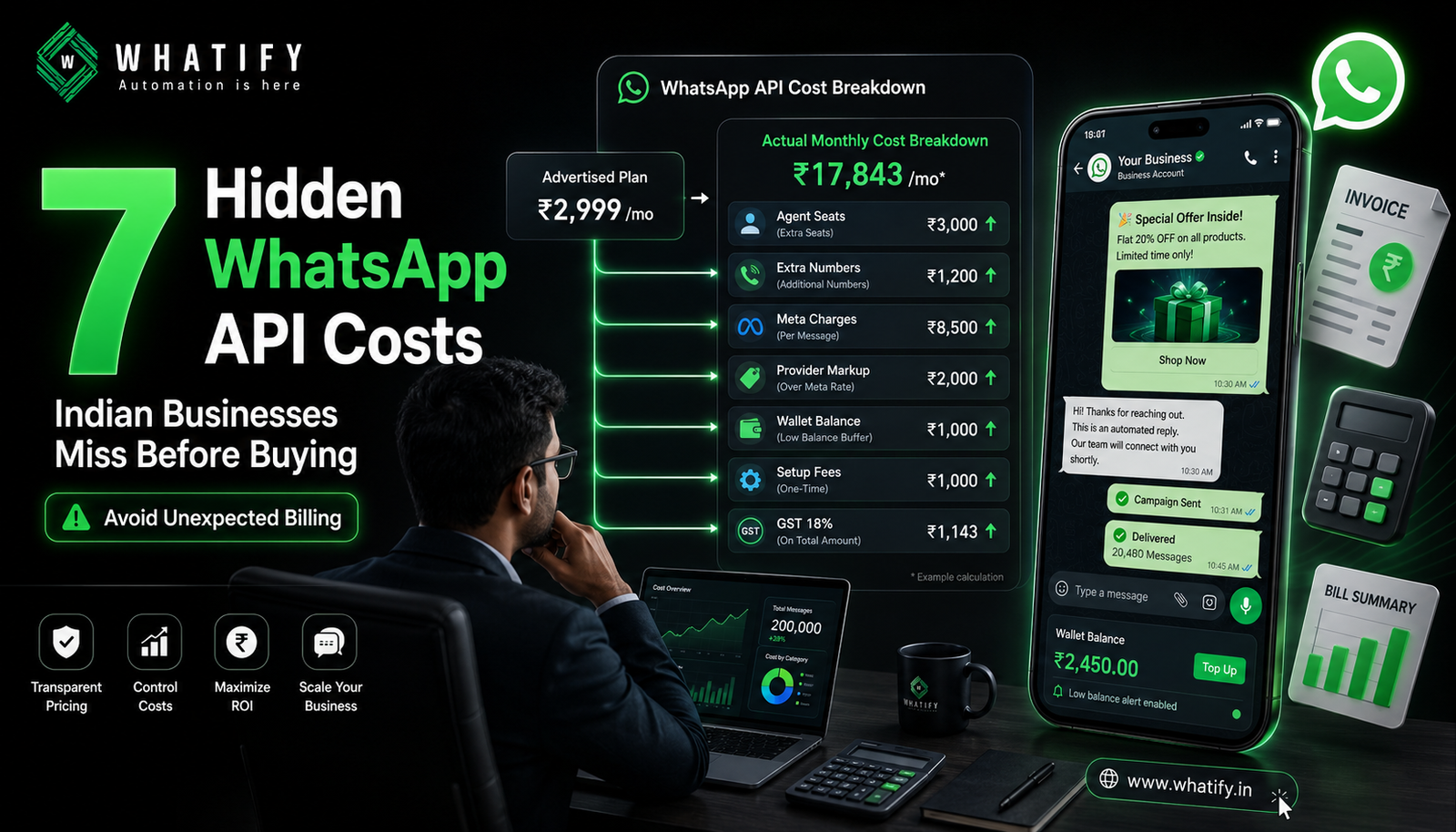
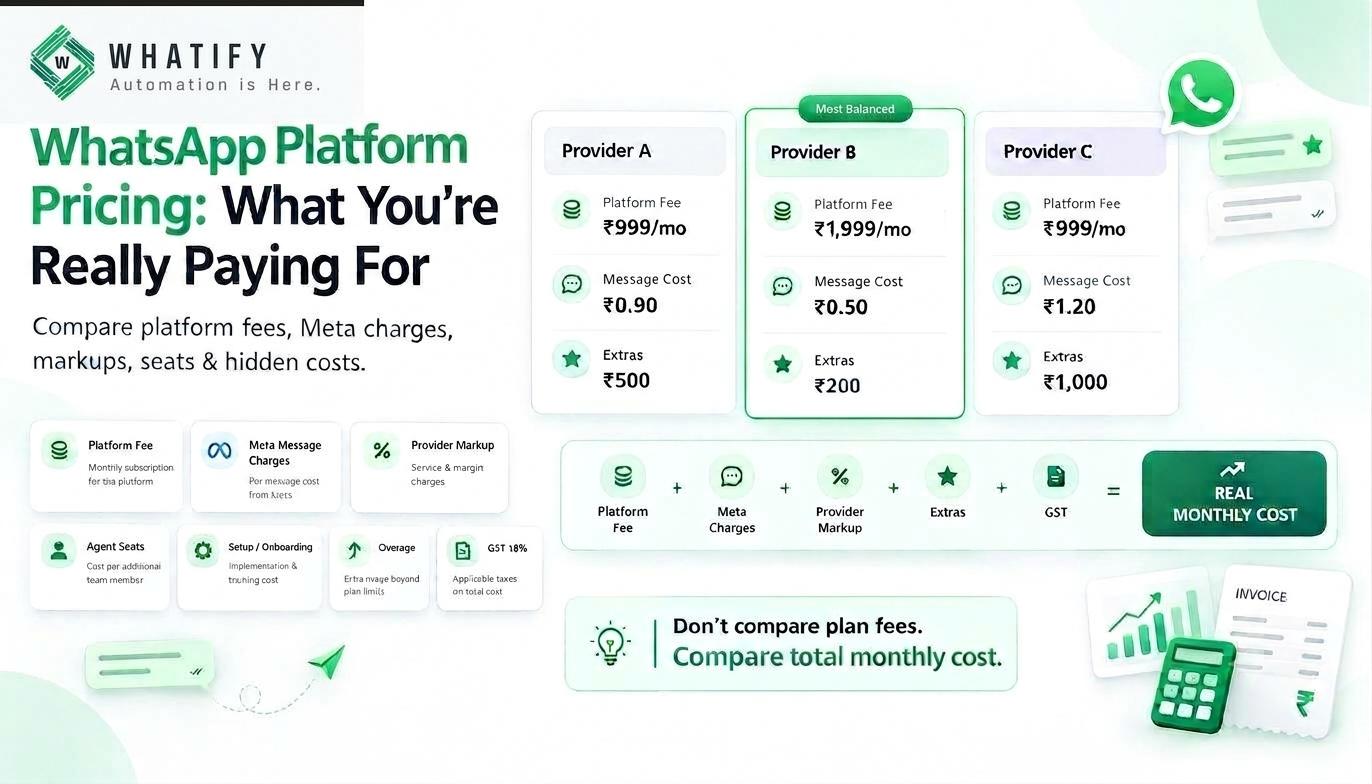
The monthly plan price is the most visible number in WhatsApp API pricing and often the least important one. Across Indian providers, the same nominal plan can produce very different invoices depending on how agent seats, extra numbers, per-message markups and setup fees are structured. None of this is necessarily hidden in a dishonest sense — it is simply below the fold on the pricing page.
Here are the seven places cost accumulates, and the questions that surface each one before you commit.
1. Per-agent seat charges
Many platforms include two or three users and charge monthly for each additional one. This is the single largest source of budget drift, because team size grows quietly. A support team that expands from three agents to eight adds a recurring line nobody approved as a purchase.
Ask: How many agent seats are included, what does each extra seat cost per month, and is there a discount at higher seat counts?
Watch for: platforms that count an admin or a read-only viewer as a billable seat.
2. Per-number charges
If you run separate WhatsApp numbers for sales and support, or one per city or franchise, check whether each number carries its own subscription. On some platforms a second number effectively doubles the platform fee.
Ask: Is the plan priced per account or per WhatsApp number?
3. Per-message markup above Meta's rate
Meta charges the provider; the provider charges you. The difference is the markup, and it is frequently not published. A markup of a few paise per message is invisible at 2,000 messages a month and material at 200,000.
Ask: What is your markup over Meta's rate, in paise, per category? Can I see Meta's charge and your margin separately in billing?
The cleanest answer is a provider that publishes a flat wallet rate per category so you can calculate spend yourself. Our guide to WhatsApp Business API pricing in India shows how to model the full stack.
4. Feature gating on the plan ladder
The chatbot builder, campaign scheduling, analytics, API access and integrations are sometimes reserved for higher tiers or sold as add-ons. Businesses sign up on an entry plan, discover the automation they came for sits two tiers up, and upgrade within a month.
Ask: Which of these are included on the plan I am considering — chatbot builder, broadcast campaigns, shared inbox, analytics, API access, Shopify and WooCommerce integrations?
A useful benchmark: on Whatify these are included across plans rather than gated, and the features page lists inclusions per plan.
5. Setup, onboarding and green tick fees
One-time charges appear under several names — onboarding, activation, account setup, or assistance with verification. Some providers charge separately to help apply for the verified badge, which is a Meta process with no fee of its own.
Ask: Is there any one-time charge at all, and what exactly does it cover?
6. Wallet minimums and expiry
Prepaid wallets are standard and reasonable. The details matter: what is the minimum recharge, does unused balance expire, and do campaigns pause automatically when the balance runs low?
An expiring wallet is a real cost if your volume is seasonal. A business that recharges ₹10,000 before Diwali and uses ₹6,000 has lost money if the balance lapses.
Ask: What is the minimum recharge, does the balance expire, and is there a low-balance alert before sending stops?
For reference, Whatify's published minimum recharge is ₹500 with low-balance alerts before campaigns pause.
7. Contract length and annual lock-ins
Discounted annual pricing is genuinely cheaper if the platform fits. It is expensive if you switch in month three. Check whether the discount requires an upfront annual payment and whether any refund exists.
Ask: Is the annual discount paid upfront, and what happens if I cancel at month three?
And the one everyone forgets: GST
Most Indian rate cards are quoted excluding GST. At 18%, that is not a rounding error on a ₹40,000 monthly spend. Add it before you present a number to your finance team.
A worked comparison of the same "₹2,999 plan"
Two providers both advertise ₹2,999. A team of six agents sending 20,000 marketing messages a month:
|
Line item |
Provider A |
Provider B |
|
Plan |
₹2,999 |
₹2,999 |
|
Agent seats (6, with 3 included) |
₹3,000 (₹1,000 × 3 extra) |
₹0 (unlimited) |
|
Chatbot builder add-on |
₹1,500 |
₹0 (included) |
|
Marketing messages (20,000) |
₹19,000 (₹0.95) |
₹18,000 (₹0.90) |
|
Monthly subtotal |
₹26,499 |
₹20,999 |
The illustrative figures above show structure, not a claim about any named vendor — the point is that the headline number was identical and the bill differs by over ₹5,000. Build this table for every provider on your shortlist using their actual published terms.
The five questions that surface almost everything
1. What is my total monthly cost at my volume and my team size, including GST?
2. What is included versus charged extra on this specific plan?
3. What is your per-message rate by category, and is Meta's charge shown separately?
4. Is there any one-time fee?
5. What happens to my wallet balance and my data if I leave?
A provider that answers all five in writing without hedging is usually the one worth shortlisting. If you want to test the numbers rather than the sales pitch, start a 14-day free trial and watch actual spend on a real campaign. For a like-for-like view of how platform costs stack up across vendors, our comparison of Wati alternatives for Shopify and D2C brands works through the same arithmetic.
EXTERNAL SOURCES
1. Meta — Pricing on the WhatsApp Business Platform (updated 5 Aug 2026): confirms Meta charges per delivered template message and that access itself carries no Meta fee, which is what makes provider markup identifiable. https://developers.facebook.com/docs/whatsapp/pricing/
2. Meta — Business verification and account setup documentation: verification is a Meta process, relevant to the green-tick fee question. https://developers.facebook.com/docs/whatsapp/business-management-api/
3. Whatify — pricing page (published wallet rates, ₹500 minimum recharge, GST note). https://whatify.in/pricing
4. Whatify — features page (per-plan inclusions). https://whatify.in/features
Frequently Asked Questions
Seven items account for most surprises: per-agent seat charges, per-number subscription fees, per-message markup over Meta's rate, features gated to higher plans, one-time setup or onboarding fees, wallet minimums and expiry rules, and annual lock-ins. GST on top of all of it is the eighth.
Many do. A typical structure includes two or three seats and bills monthly for each additional user, which becomes significant as a support team grows. Some platforms include unlimited agents instead. Confirm how seats are counted, including whether admin and read-only users are billable.
Verification is a Meta process and Meta does not sell the badge. Some providers charge a service fee to prepare and submit the application on your behalf. That fee is for their assistance, not for the badge itself, so treat it as an optional service and confirm what it includes.
It is the margin a provider adds to Meta's per-message charge. Many platforms bundle it into a single rate without disclosing the split. Ask for the rate per category in paise and whether billing shows Meta's charge separately from the platform margin. Flat published wallet rates make this easier to verify
It depends on the provider — some balances carry forward indefinitely, others lapse after a period. This matters most for seasonal businesses that recharge heavily before a festive peak. Ask about expiry and low-balance alerts before making a large recharge.
Ready to automate your WhatsApp marketing?
Start your 14-day free trial today. No credit card required.
Start Free Trial