Marketing vs Utility vs Authentication: How Template Category Sets Your Bill
Your WhatsApp template category decides your per-message rate. See how Meta assigns categories, what each costs, and how to write notifications that qualify as utility.
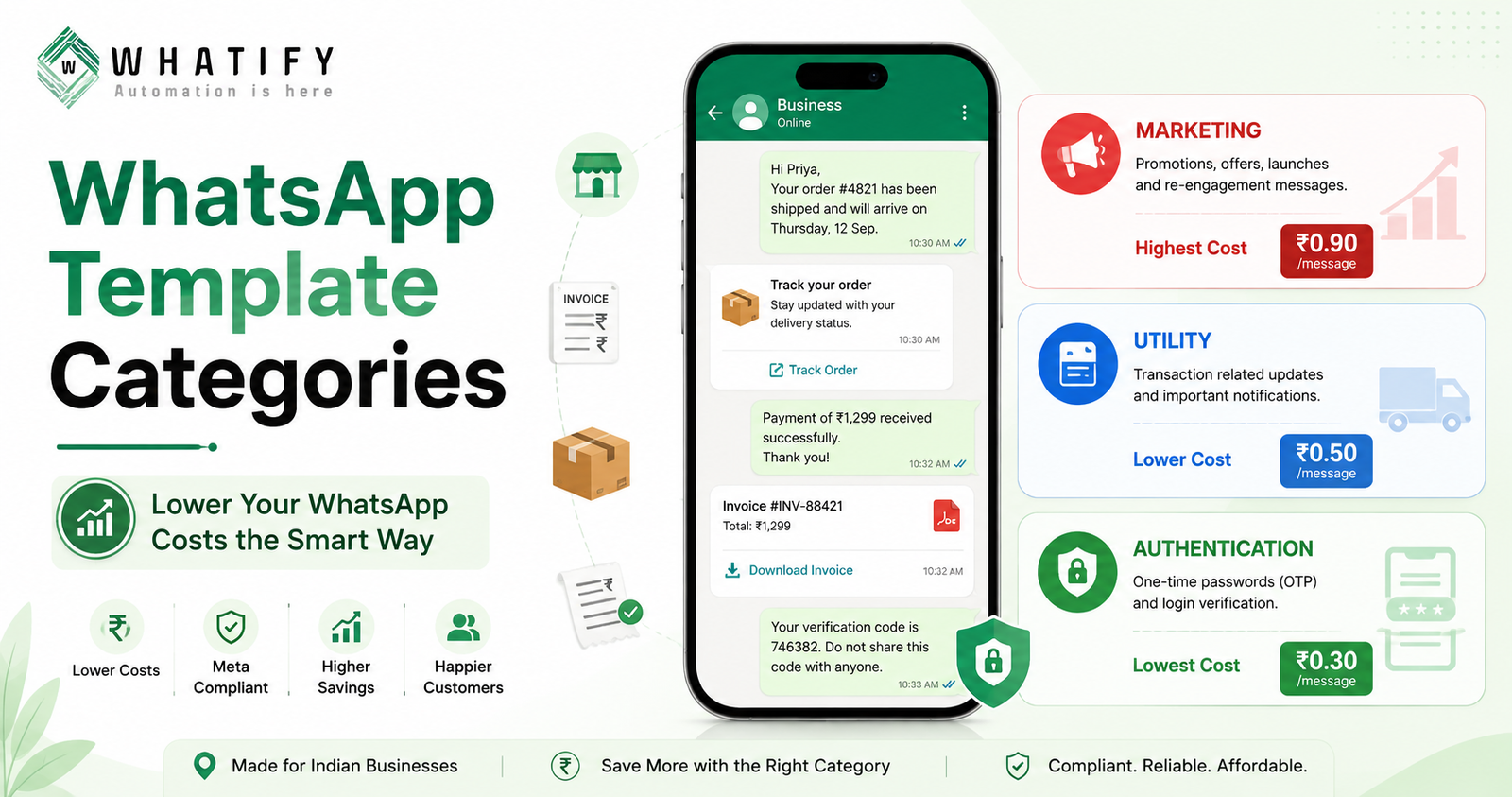
Every WhatsApp template you send is assigned one of three categories by Meta — marketing, utility or authentication — and that category, not the length or content of your message, decides the rate you pay. In India, marketing is the most expensive category, utility costs significantly less, and authentication is the cheapest. Two businesses sending identical monthly volumes can receive very different invoices purely because of category mix.
You cannot pick your category freely. Meta assigns it during template review based on what the message does. But you can write messages that legitimately qualify for a cheaper category, and that single habit is the most reliable way to lower a WhatsApp bill without sending less.
The three categories at a glance
|
Category |
What it is for |
Relative cost in India |
Charged inside an open window? |
|
Marketing |
Offers, launches, re-engagement, anything promotional |
Highest |
Yes |
|
Utility |
Updates tied to a specific transaction the customer made |
Mid — well below marketing |
Free until 1 Oct 2026, chargeable after |
|
Authentication |
One-time passcodes and login verification |
Lowest |
Yes |
On Whatify's published wallet rates, that spread is ₹0.90 for marketing, ₹0.50 for utility and ₹0.30 for authentication, excluding GST. The gap between marketing and utility is the one that moves budgets. If you send 20,000 messages a month, shifting even a quarter of them from marketing to utility changes the message line meaningfully.
For the complete cost picture including platform fees and GST, see our breakdown of WhatsApp Business API pricing in India.
How Meta actually decides the category
Meta reviews the template's purpose and content, not the label you attach to it. The test it applies is essentially this: is this message a direct consequence of something the customer specifically did, or is it an attempt to sell them something?
An order confirmation exists because the customer placed an order. That is utility. A message announcing a sale exists because you want revenue. That is marketing. The distinction sounds obvious in those two examples, and it is — the problems start in the middle ground.
Meta can also re-categorise an approved template later if the content drifts or if it decides the original assignment was wrong. Businesses discover this when a template that was billing as utility starts billing as marketing.
The line businesses cross without meaning to
The most common mistake is attaching a promotion to a genuine transactional message. Consider:
"Hi Priya, your order #4821 has shipped and will arrive Thursday."
That is clean utility. Now consider:
"Hi Priya, your order #4821 has shipped and will arrive Thursday. Get 20% off your next order with code SAVE20!"
The second version does something the first does not — it markets. Meta is likely to classify it as marketing, and you pay the marketing rate on every send. The discount line may well be worth it. The point is that it should be a deliberate decision, not an accident discovered on an invoice.
Other patterns that push a template into marketing:
· Opening with a greeting that has no transactional anchor ("Hope you're doing well!")
· Referencing products the customer has not bought or interacted with
· Vague subject matter that could apply to any customer on your list
· Calls to action that lead to a catalogue or offers page rather than to the specific transaction
How to write a template that qualifies as utility
Four rules cover most cases.
1. Anchor it to a specific event. Name the order, booking, payment, ticket or appointment. Variables like {{order_id}} and {{delivery_date}} are strong signals that the message is transactional.
2. Keep the call to action on the same transaction. "Track your order" belongs in a shipping update. "Browse new arrivals" does not.
3. Say only what the update requires. Every extra promotional sentence increases re-categorisation risk.
4. Separate the two jobs. If you genuinely want to promote something to recent buyers, send it as its own marketing template to a segmented list. You will pay the marketing rate on a small, relevant audience rather than the marketing rate on every shipping notification you send.
Utility messages that most Indian businesses under-use
Many teams run almost everything as marketing simply because they never built the transactional flows. These are all legitimate utility use cases:
· Order confirmed, packed, shipped, out for delivery, delivered
· Payment received, payment failed, invoice due, refund processed
· Appointment booked, rescheduled, reminder, follow-up due
· Booking confirmed, ticket issued, trip-day details
· Subscription renewing, plan expiring, service due
Each one is a message the customer wants, arrives at a moment they are paying attention, and costs less than a promotional blast. Building them once in a visual flow builder means they run without anyone touching them.
What changes on 1 October 2026
One category rule is changing. Utility templates sent inside an open 24-hour customer service window have been free since July 2025. From 1 October 2026, Meta will charge for them, along with free-form service messages. Utility remains far cheaper than marketing — but the "free if the window is open" advantage disappears. We cover the full change in our guide to Meta's October 2026 service message charges.
A quick audit worth doing this month
Open your template library and sort by send volume. For your top ten templates by volume, ask one question each: is there a promotional sentence in here that is not doing enough work to justify the marketing rate?
Most teams find at least two templates where a single appended offer line has quietly upgraded a high-volume transactional message to the most expensive category on the platform. Removing it is a five-minute edit.
You can review category assignment and per-template send volumes inside your dashboard — start a 14-day free trial to see the split on your own templates.
Verify categories against Meta's own rules
Category definitions and examples are maintained by Meta and occasionally updated. Before restructuring a large template library, check the current guidance in Meta's template categorisation documentation.
EXTERNAL SOURCES
1. Meta — Message templates and categorisation, WhatsApp Business Management API documentation: category definitions, review process, re-categorisation. https://developers.facebook.com/docs/whatsapp/business-management-api/message-templates/
2. Meta — Pricing on the WhatsApp Business Platform (updated 5 Aug 2026): per-category billing, customer service window. https://developers.facebook.com/docs/whatsapp/pricing/
3. Meta — Upcoming pricing updates (updated 1 Jul 2026): 1 October 2026 charging of in-window utility templates. https://developers.facebook.com/documentation/business-messaging/whatsapp/pricing/non-template-messages
4. Whatify — pricing page (wallet rates by category). https://whatify.in/pricing
Frequently Asked Questions
You select a category when submitting a template, but Meta makes the final decision during review based on the message's purpose and content. Meta can also re-categorise an approved template later. Write the message so it genuinely fits the category you want rather than relying on the label you select.
Authentication is the lowest-cost category, followed by utility, with marketing the most expensive. On Whatify's published wallet rates the split is ₹0.30 authentication, ₹0.50 utility and ₹0.90 marketing, excluding GST. Authentication is restricted to one-time passcodes and login verification, so it is not a lever most businesses can pull.
Meta most likely re-categorised it. The usual cause is promotional content inside a transactional message — a discount code, an upsell line, or a call to action pointing at a catalogue rather than the specific order. Remove the promotional element and resubmit, or accept the marketing rate as a deliberate choice.
You can, but it will likely move the template into the marketing category and you will pay the marketing rate on every send. If the offer matters, a better structure is a clean utility confirmation plus a separate marketing template sent to a segmented audience.
A utility message is a pre-approved template tied to a transaction, such as an order update. A service message is a free-form reply your team sends inside the 24-hour customer service window, with no template required. Both become chargeable inside an open window from 1 October 2026.
Ready to automate your WhatsApp marketing?
Start your 14-day free trial today. No credit card required.
Start Free Trial