How to Get WhatsApp Business API Approved in India
Approval turns on document consistency, not paperwork volume. Here is what Meta checks, which documents work best in India, and the mismatches that cause rejection.
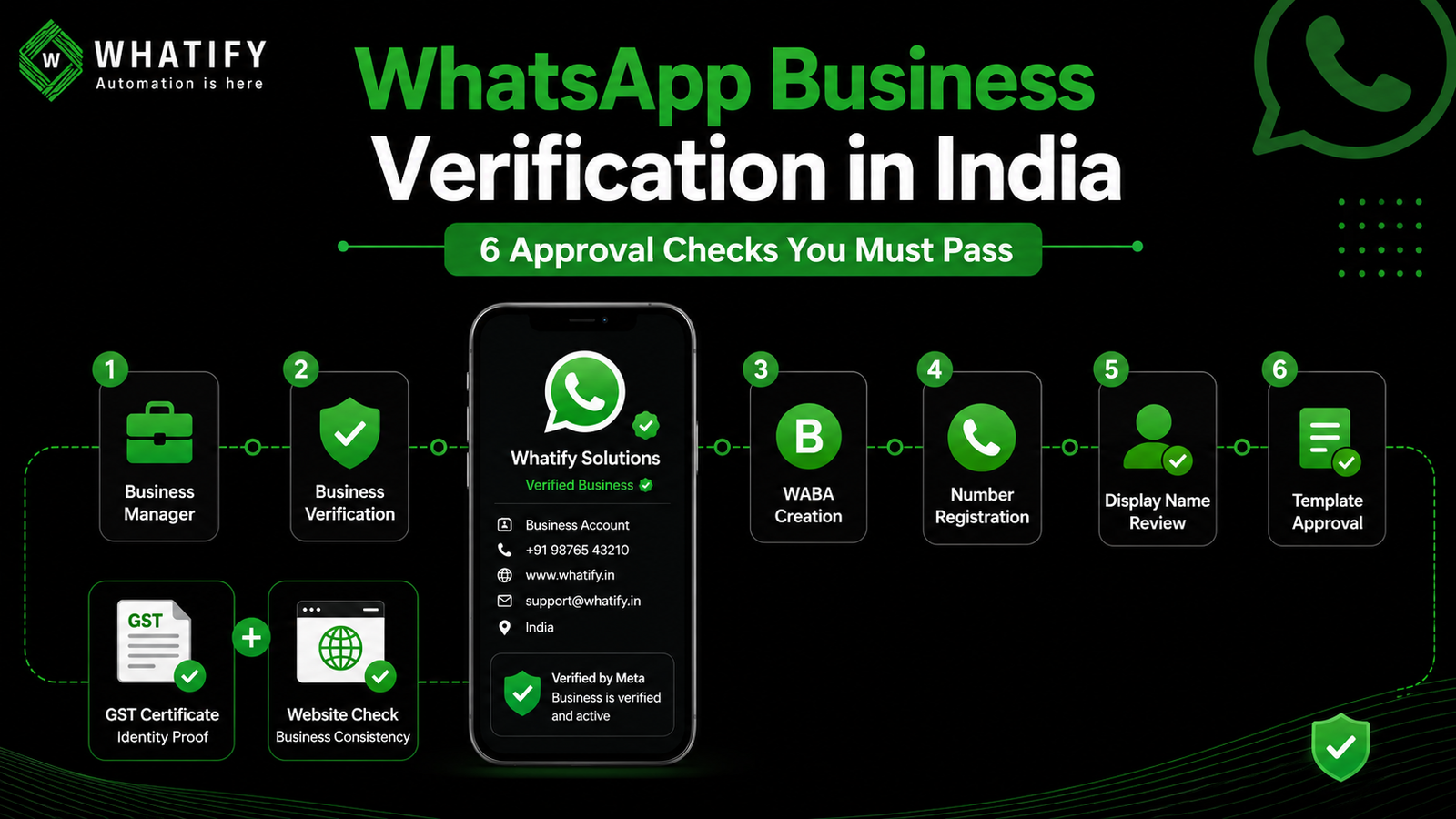
Approval is not one decision. It is six checks, and most Indian businesses stall on the second one for a reason that has nothing to do with their eligibility: the business name on their GST certificate does not exactly match the name in their Meta Business Manager.
Fix the consistency problem before you apply and the rest is administrative.
The six stages
|
Stage |
What happens |
Who decides |
|
1. Business Manager |
You create a Meta business portfolio |
You |
|
2. Business Verification |
Meta confirms your entity legally exists |
Meta |
|
3. WABA creation |
A WhatsApp Business Account is created under your portfolio |
Your provider |
|
4. Number registration |
A dedicated number is attached and verified by OTP |
You |
|
5. Display name review |
The name customers will see is approved |
Meta |
|
6. First template approval |
Your first message template is reviewed |
Meta |
Only stages 2, 5 and 6 can be rejected. Everything else is setup.
Before you apply: the consistency audit
Meta cross-checks your submitted document against your Business Manager name, your website, and your contact details. Any inconsistency reads as a risk signal.
Line up these five and make them identical:
1. Legal name in Meta Business Manager
2. Legal name on your registration document
3. Business name on your website — including the footer and contact page
4. Phone number on the website and in Business Manager
5. Address on the document and the website
"Sharma Traders" on the GST certificate and "Sharma Trading Co." in Business Manager is a mismatch. So is a website listing a different phone number from the one you submit.
Documents that work in India
You generally need one document proving legal identity, and often a second supporting address or banking details.
Strong identity documents:
· GST Registration Certificate
· Certificate of Incorporation (Private Limited, LLP)
· Shops and Establishment Certificate
· Udyam / MSME Registration Certificate
· Trust deed or Society Registration Certificate, for institutions and non-profits
Useful supporting documents:
· Business bank statement, recent
· Utility bill in the business name
Documents that get rejected: business cards, letterheads, logos, brochures, website or social media screenshots, self-declarations, proposals, expired certificates, and blurry or cropped phone photos. A utility bill alone is not proof of identity.
Sole proprietors and freelancers can apply. You need a document linking the business name to an official record — GST, Shops and Establishment, or Udyam. A personal PAN or Aadhaar by itself is not enough.
Scan documents properly. A clean PDF with the registration number legible beats a photo taken at an angle.
The website check
Meta looks at your site. Before applying, make sure it is live and includes:
· The same business name as your Business Manager
· A contact page with matching phone, email and address
· A published privacy policy
· Clear information about what you sell
A site that is under construction, or that carries a different trading name, will hold up verification. An email address on your own domain rather than a free provider also helps.
The phone number rule
The number you connect must not be active on the consumer WhatsApp app or the free WhatsApp Business app. A number lives in one WhatsApp client at a time.
Most businesses use a fresh dedicated number. If you must migrate an existing one, delete the WhatsApp account on that number first and expect a period where it cannot send or receive. Do not attempt this during a campaign or a sale.
For the difference between the app and the API, see our breakdown of WhatsApp Business API versus the Business App.
Display name review
Your display name is what customers see. Meta reviews it against your business and your website. Names that are generic, that contain only a category term, or that do not appear anywhere on your site tend to be rejected. Use your actual brand name as it appears publicly.
First template approval
The final gate. Submit a straightforward utility template first rather than a promotional one — it clears faster and gets you sending. Our guide to the 11 reasons templates get rejected covers what to avoid.
What approval does not include
The green tick is separate. Business verification does not grant the Official Business Account badge. That requires demonstrable brand notability and is decided on Meta's own timeline. Our post on green tick verification explains the criteria.
Your sending limit starts low. Newly approved numbers begin at the entry tier and grow with usage and quality. Read messaging limits and tiers before planning a launch campaign.
DLT registration does not apply. The TRAI DLT framework governs SMS. WhatsApp uses Meta's own template review instead. Businesses migrating from SMS often waste time here.
If verification is rejected
Meta gives a reason. In India it is usually a name mismatch or an unreadable document. Fix the specific issue and resubmit — there is no fixed limit on attempts, though repeated failures can push you into a slower manual review. Do not resubmit the same document unchanged.
Timelines
Verification commonly resolves within a few business days, but review queues vary and no timeline is guaranteed. Template and display name reviews are usually faster. Build a buffer: do not schedule a launch that depends on same-week approval.
Whatify is an official WhatsApp Business Solution Provider and handles WABA creation and number registration as part of onboarding. Start a 14-day free trial, no credit card required.
Confirm current requirements
Meta updates verification requirements and moves screens periodically. Check the current Meta Business Verification requirements before assembling your documents.
EXTERNAL SOURCES
1. Meta — Business verification, Business Help Centre: accepted document types, the verification process, and resubmission after rejection. https://www.facebook.com/business/help
2. Meta — Get started with the WhatsApp Business Platform, Cloud API documentation: WABA structure, phone number registration, display name review. https://developers.facebook.com/docs/whatsapp/cloud-api/get-started
3. TRAI — Telecom Commercial Communications Customer Preference Regulations: cited to establish that the DLT framework governs SMS rather than WhatsApp. https://www.trai.gov.in/
Frequently Asked Questions
One document proving legal identity — GST Registration Certificate, Certificate of Incorporation, Shops and Establishment Certificate, or Udyam/MSME registration — plus a supporting document such as a recent business bank statement or utility bill in the business name. The GST certificate is widely accepted in India.
The most common cause is a name mismatch between the Meta Business Manager name, the registration document, and the website. Other frequent causes are unreadable or expired documents, submitting a letterhead or screenshot instead of a registration certificate, and a website that is offline or carries a different business name.
Yes. You need a document linking your business name to an official record, such as a GST certificate, a Shops and Establishment certificate, or Udyam registration. A personal PAN or Aadhaar on its own is not sufficient, because Meta is verifying a business rather than an individual.
Only if you first delete the WhatsApp account on that number. A number can be active in the consumer app, the Business app, or the API — one at a time. Migration involves downtime on that number, so most businesses onboard a fresh dedicated number instead.
No. DLT registration under TRAI rules applies to SMS. WhatsApp handles content approval through Meta's own message template review process. Businesses moving from SMS to WhatsApp often assume DLT carries over, and it does not.
No. Business verification and the Official Business Account badge are separate. The green tick requires demonstrable brand notability such as press coverage or significant public presence, and Meta decides it on its own timeline. Many verified businesses operate successfully without it.
Ready to automate your WhatsApp marketing?
Start your 14-day free trial today. No credit card required.
Start Free Trial