WhatsApp + WooCommerce: The Integration Guide
Connect WooCommerce to WhatsApp for order updates, abandoned cart recovery and COD confirmation — which events to automate first and what each one costs to send.
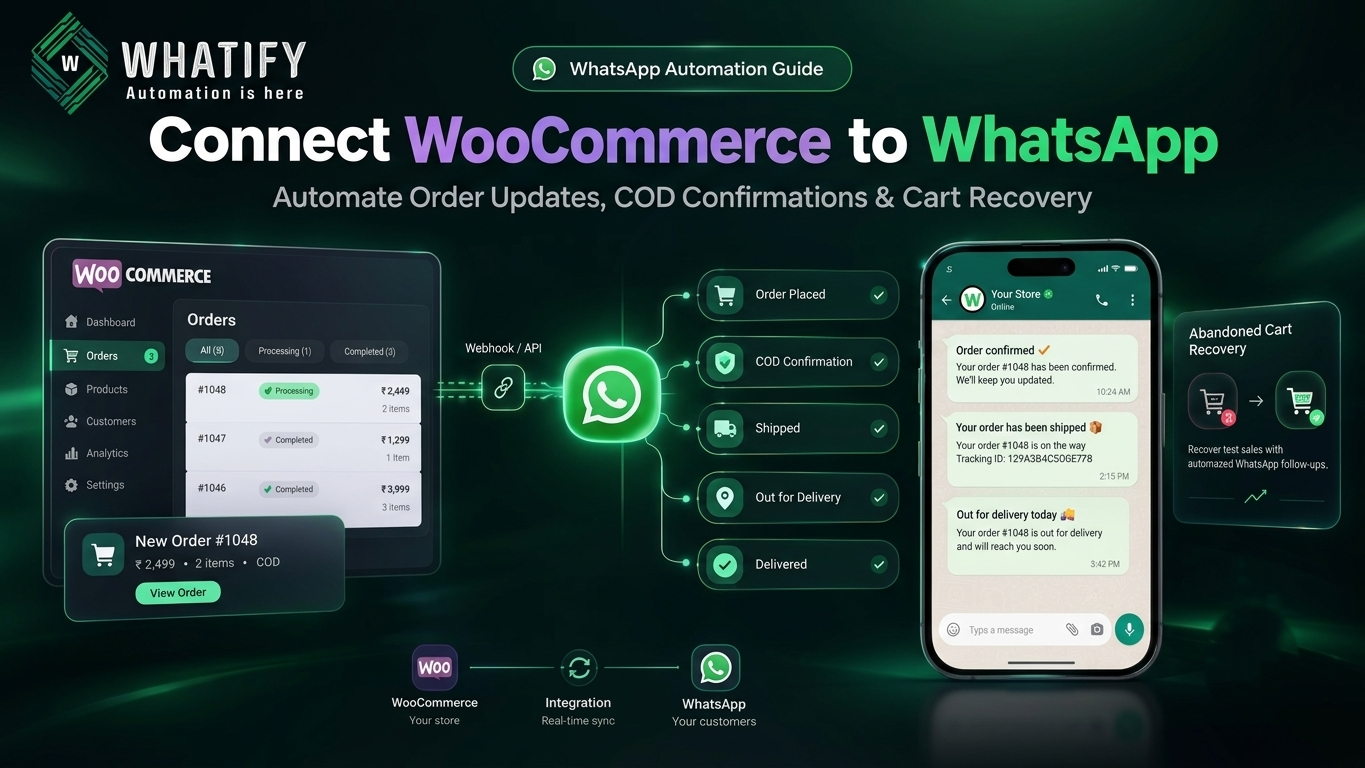
WooCommerce sends transactional email by default. In India, that email frequently goes unread — customers who bought on a phone rarely check a promotions tab. WhatsApp closes that gap for order communication.
This guide covers which store events to connect, in what order, and how each is categorised and charged.
What to connect, in priority order
Do not automate everything at once. Sequenced by return:
|
Priority |
Event |
Purpose |
Template category |
|
1 |
Order placed |
Confirmation and reassurance |
Utility |
|
2 |
COD order placed |
Verify intent before dispatch |
Utility |
|
3 |
Order shipped |
Tracking link |
Utility |
|
4 |
Out for delivery |
Availability prompt |
Utility |
|
5 |
Cart abandoned |
Recovery |
Marketing |
|
6 |
Delivered |
Feedback or review request |
Utility or Marketing by content |
|
7 |
Reorder reminder |
Repeat purchase |
Marketing |
The first four are utility templates and cost less to send than marketing. Start there — they also generate the fewest complaints, because customers expect them.
Category assignment affects both cost and approval. Our guide to template categories and pricing explains how Meta decides, and getting this wrong is a common rejection cause.
The COD case
Cash on delivery remains a large share of Indian e-commerce, and return-to-origin on unverified COD orders is a direct loss — you pay shipping both ways on goods that never sold.
A confirmation message shortly after a COD order is placed, with Confirm and Cancel buttons, lets customers cancel before dispatch rather than refusing at the door. Our post on WhatsApp automation for e-commerce covers the flow in detail, including timing and message structure.
Connecting the two systems
Three approaches, depending on your setup:
1. Native integration through your WhatsApp platform. The provider connects to WooCommerce directly and maps store events to templates. Least work, no code, and the right default for most stores.
2. Webhooks. WooCommerce fires a webhook on order status change; your WhatsApp platform receives it and sends the mapped template. Useful when you need conditional logic the native integration does not support.
3. Middleware. A tool like Zapier or Make sits between the two. Flexible, but adds a monthly cost and a failure point. Choose it only if you are already routing other systems through it.
Whatify supports WooCommerce alongside Shopify, Google Sheets and webhook-based integrations — see the integrations overview.
Field mapping that prevents failures
Most integration problems are data problems, not connection problems.
Phone number format. WooCommerce accepts almost anything in the billing phone field. WhatsApp needs a number with a country code and no spaces or punctuation. Normalise on the way in — add a country code default, strip formatting characters, and reject entries that fail validation at checkout rather than at send time.
Empty variables break delivery. If your template includes a tracking link and the order ships without one recorded, the message fails. Set a fallback value for every variable, or gate the send on the field being populated.
Order ID consistency. Send customers the order number they can see in their account, not an internal database ID.
Consent at checkout
Add an explicit WhatsApp opt-in checkbox at checkout, unticked, separate from your terms and conditions. Keep transactional and marketing consent separate, because a customer who agreed to delivery updates has not agreed to promotional broadcasts.
This matters commercially and legally — see our guide to DPDP consent records for what to store.
Abandoned cart timing
The one marketing flow worth building early. A workable sequence for most stores:
· First message, 1–3 hours after abandonment — helpful, no discount. Many carts are abandoned through distraction, not price.
· Second message, roughly 24 hours later — add a reason to return, such as low stock or a modest incentive.
· Stop there. A third message to someone who ignored two is where block rates come from.
Suppress anyone who completed the purchase between sends. Nothing damages trust faster than a cart reminder for an order already paid for.
Testing before you go live
1. Place a real test order and walk it through every status change.
2. Check each template renders with real data, especially names with unusual characters.
3. Test with a number that has never messaged your business, to confirm the template path rather than the free-form path.
4. Confirm costs against your expected order volume — utility and marketing rates differ substantially. Our cost per message guide has the arithmetic.
Running on Shopify instead?
We have a dedicated walkthrough for WhatsApp and Shopify integration.
Start a 14-day free trial to connect a store and test the order flows with real data.
EXTERNAL SOURCES
1. WooCommerce — Webhooks documentation: order status events available for integration. https://woocommerce.com/document/webhooks/
2. Meta — Message templates, WhatsApp Business Management API: variable handling and the effect of empty parameters on delivery. https://developers.facebook.com/docs/whatsapp/business-management-api/message-templates/
3. Meta — Pricing, WhatsApp Business Platform: utility and marketing category rates. https://developers.facebook.com/docs/whatsapp/pricing
Frequently Asked Questions
Three routes. A native integration through your WhatsApp platform maps store events to templates with no code and suits most stores. Webhooks give you conditional logic when the native mapping is insufficient. Middleware such as Zapier is flexible but adds cost and an extra failure point.
Start with order confirmation, COD verification, shipping notification and out-for-delivery. All four are utility templates, which cost less than marketing templates and generate the fewest complaints because customers expect them. Add abandoned cart recovery and reorder reminders afterwards.
Usually a data problem rather than a connection problem. The most common causes are phone numbers stored without a country code or with formatting characters, and template variables that resolve to empty values because the underlying field was blank. Normalise numbers at checkout and set fallbacks for every variable.
Yes, using a marketing template. A helpful first message one to three hours after abandonment and a second around twenty-four hours later works for most stores. Stop after two, and suppress any customer who completed the purchase between messages.
No. Order notifications are template messages and are charged at Meta's utility rate, which is lower than the marketing rate. Costs scale with order volume, so estimate against your monthly orders before enabling every event.
Add an explicit, unticked WhatsApp opt-in at checkout, kept separate from your terms and conditions. Capture transactional and marketing consent as distinct records, because agreement to delivery updates does not extend to promotional messages.
Ready to automate your WhatsApp marketing?
Start your 14-day free trial today. No credit card required.
Start Free Trial