Click-to-WhatsApp Ads: What Happens After the Click
The ad is the easy part. Most Click-to-WhatsApp budget is wasted in the first two messages — here is how to design the conversation that follows the tap.
Click-to-WhatsApp ads move a Facebook or Instagram user straight into a WhatsApp conversation with your business. Meta documents how to build them well, so this article covers the part that actually determines return: the conversation.
Most wasted Click-to-WhatsApp budget is lost in the first two messages. The click is paid for, the person arrives, and nothing useful happens.
The 72-hour window you are paying for
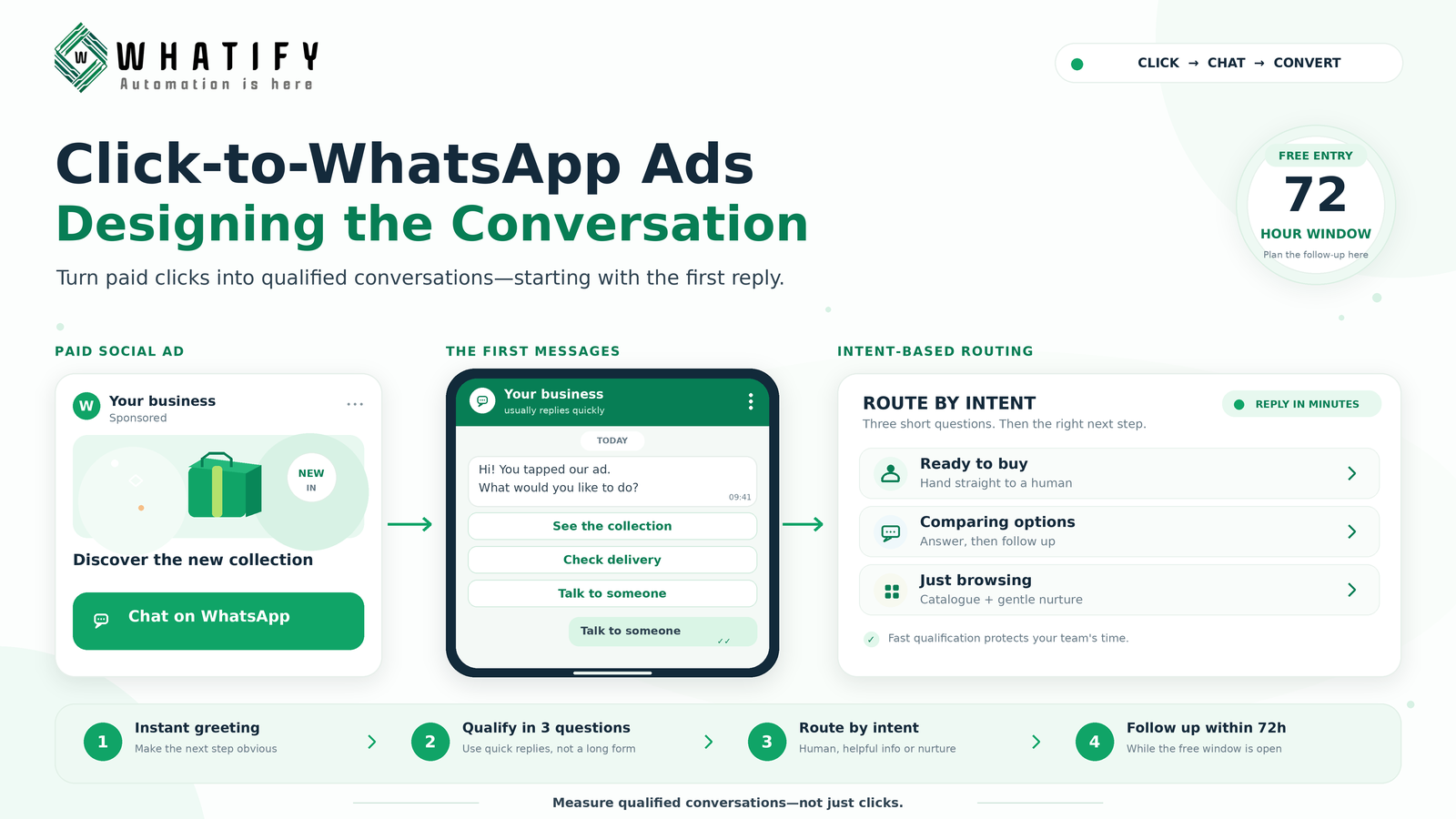
When someone reaches you through a Click-to-WhatsApp ad, a free entry point conversation opens — Meta allows a 72-hour window in which business messages in that conversation are not charged.
That is a genuine commercial advantage, and most advertisers waste it. Three days of unlimited follow-up, spent on a single automated greeting and then silence.
Plan the window deliberately: immediate response, qualification, useful answer, follow-up within the window, and only then a template message after it closes.
The greeting decides everything
The first automated message arrives seconds after the tap. It has three jobs: confirm they reached the right business, deliver something useful immediately, and make the next step obvious.
What fails:
· "Hi! Thanks for contacting us. How can we help you?" — puts the work on the customer
· A wall of company introduction
· Immediately asking for name, email and phone number
What works: reference the specific thing they clicked, then offer two or three buttons that map to real intents.
"Hi — you tapped our monsoon collection ad. Which would you like?
· See the collection
· Check delivery to your pincode
· Talk to someone"
The greeting should reflect the ad. If you run five ad sets, you need more than one greeting. A generic greeting behind a specific ad is the most common leak in the whole funnel.
Qualify in three questions, not eight
Ad traffic is colder than organic enquiry traffic. Long forms lose people.
Three questions is usually the limit before drop-off becomes serious. Choose the three that actually change what you do next — typically what they want, when they need it, and budget or size band. Offer buttons rather than free text wherever the answer set is finite.
Everything else can be learned later in the conversation, or by the salesperson.
Route by intent immediately
|
Intent signalled |
Route |
|
Ready to buy |
Human, immediately, within business hours |
|
Comparing options |
Automated information, then human follow-up |
|
Price checking |
Send the range; do not stall |
|
Just browsing |
Catalogue or content; tag and nurture |
|
Wrong fit |
Say so politely and close it |
That last row saves more money than any optimisation. Ads attract unqualified traffic; recognising it quickly protects your team's time.
Our chatbot flow examples include a lead qualification flow that maps directly onto ad traffic.
Speed is the variable you control
Response time matters more for paid traffic than for any other source, because the visitor was mid-scroll thirty seconds ago. An automated greeting must be instant. A human reply should follow within minutes during business hours, not hours.
If you cannot staff that, run the ads only during hours you can, and set an honest away message outside them.
Measure cost per qualified conversation
Cost per click and cost per conversation started both flatter the channel. Neither tells you whether the money worked.
Track instead:
· Conversations started — the paid click actually landed
· Conversations qualified — the three questions completed
· Conversations converted — sale, booking or agreed next step
· Cost per qualified conversation — ad spend divided by qualified count
· Cost per conversion — the number that decides whether to scale
The gap between conversations started and conversations qualified tells you whether the greeting is working. A large gap is a greeting problem, not an ad problem, and no amount of creative testing will fix it.
Our campaign metrics guide covers the wider measurement set.
After the free window closes
At 72 hours the conversation closes and further business-initiated messages require an approved template and are charged at the applicable category rate — see current rates.
So plan the sequence inside the window rather than after it. One well-timed follow-up on day two costs nothing and outperforms a template message on day five.
A realistic setup order
1. Define the three qualification questions
2. Write one greeting per ad set, not one in total
3. Build the routing rules
4. Roster humans for the hours the ads run
5. Set up tagging so the source is visible later
6. Run a small budget, read the started-to-qualified gap, fix the greeting
7. Then scale spend
Whatify's flow builder and shared inbox handle the greeting, qualification and routing described here. Start a free trial and test the conversation before increasing ad spend.
EXTERNAL SOURCES
1. Meta — Conversation-based pricing and free entry point conversations: the 72-hour window opened by Click-to-WhatsApp ads. https://developers.facebook.com/docs/whatsapp/pricing
2. Meta — Click to WhatsApp ads, Meta Business Help Centre: ad setup and configuration. https://www.facebook.com/business/help/447934475640650
3. Meta — WhatsApp Business Messaging Policy: rules governing business-initiated follow-up. https://business.whatsapp.com/policy
Frequently Asked Questions
When someone reaches your business through a Click-to-WhatsApp ad, a free entry point conversation opens and Meta does not charge for business messages within a 72-hour window. Plan your greeting, qualification and follow-up inside that window rather than sending a paid template afterwards.
It should reference the specific ad they tapped, give something useful immediately, and offer two or three buttons matching real intents. Generic greetings such as "How can we help you?" put the work back on a cold visitor and are the most common cause of drop-off.
Three at most. Ad traffic is colder than organic enquiry traffic, so drop-off rises sharply beyond that. Pick the three that change what you do next — usually what they want, when they need it, and a budget or size band — and use buttons rather than free text.
Look at the gap between conversations started and conversations qualified. A large gap points to the greeting and qualification flow rather than the ad creative. If the ad is delivering people and the conversation loses them, more creative testing will not fix it.
Conversations started, conversations qualified, conversations converted, cost per qualified conversation and cost per conversion. Cost per click and cost per conversation started both make the channel look better than it is because neither reflects lead quality.
For each ad set, yes. A greeting that references what the person actually tapped performs considerably better than a single generic message behind every campaign. Running five ad sets through one greeting is a common and expensive mismatch.
Ready to automate your WhatsApp marketing?
Start your 14-day free trial today. No credit card required.
Start Free Trial