WhatsApp Quality Rating Dropped to Low? A Recovery Playbook
A red or yellow WhatsApp quality rating blocks tier upgrades and can pause templates. Here is what causes it, how to diagnose the source, and a 14-day recovery plan.
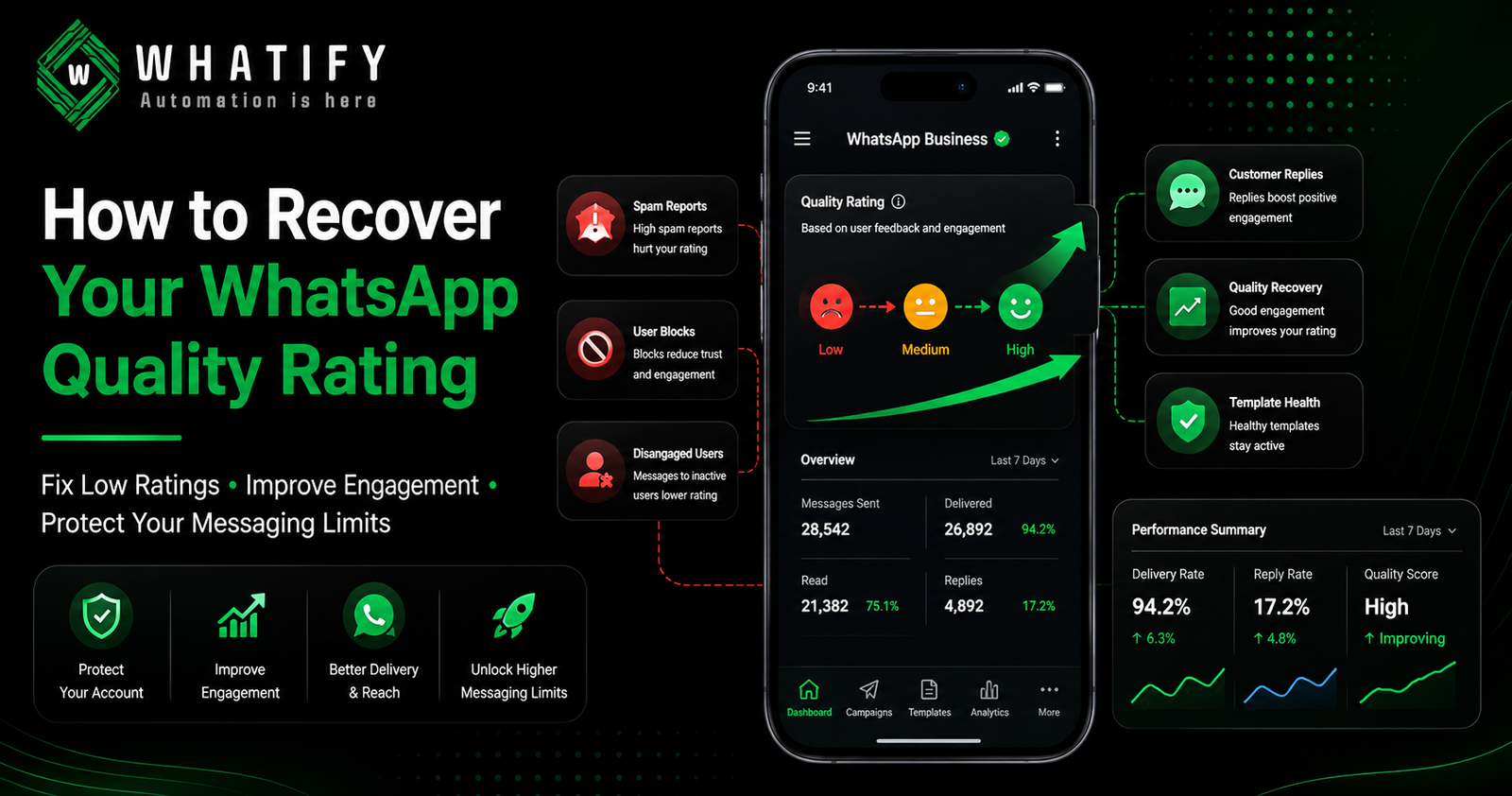
WhatsApp assigns your phone number a quality rating of High (green), Medium (yellow) or Low (red), based primarily on how recipients react to your messages over a rolling window. Blocks and "report spam" actions push it down. A low rating does not immediately stop you sending, but it blocks messaging tier upgrades and puts your templates at risk of being paused.
The rating reflects recipient behaviour, not message content in isolation. Two businesses can send the identical template and receive different ratings depending on who they sent it to and whether those people wanted it.
What the rating actually measures
|
Signal |
Effect |
|
Users blocking your number |
Strong negative |
|
Users reporting your messages |
Strong negative |
|
Messages sent to people who never engage |
Negative over time |
|
Users replying and engaging |
Positive |
Two things follow. First, sending to the wrong people damages you more than writing an imperfect message. Second, the rating is a rolling measure — it recovers as recent good behaviour outweighs older bad behaviour.
Template quality is separate from account quality
This distinction is the one most teams miss, and it changes how you diagnose the problem.
Individual templates carry their own quality rating. A single template that generates blocks can be paused by Meta, meaning it cannot be sent until edited and re-approved. If a template is paused repeatedly for low quality, it can be permanently disabled.
So when quality drops, the right question is not "what is wrong with our account" but "which template is doing this". Usually it is one.
Diagnose before you change anything
Work through this in order.
1. Open WhatsApp Manager and check per-template quality. Sort your templates by send volume, then look at quality flags. The culprit is almost always a high-volume marketing template.
2. Identify what changed 3–7 days before the drop. New template launched? Bigger list? A bought or scraped list? A campaign to contacts who had not heard from you in months?
3. Check your audience source. Contacts who opted in six months ago and have never been messaged since are high-risk. So is any list where you cannot point to the moment consent was given.
4. Check send frequency per person. Three marketing messages a week to the same contact generates blocks quickly, regardless of quality of writing.
5. Check relevance. A generic offer sent to your entire database will always underperform a targeted one, and the blocks compound.
The 14-day recovery plan
Days 1–3: Stop the bleeding
· Pause every marketing campaign. Not reduce — pause.
· Pause or edit the specific templates flagged in WhatsApp Manager.
· Keep sending utility and transactional messages. These are wanted, they generate engagement, and engagement helps.
Days 4–7: Rebuild engagement signals
· Send only to your most engaged segment — people who replied or purchased in the last 30 days.
· Prioritise messages that invite a reply. A reply is the strongest positive signal available.
· Keep volume low and relevance high.
Days 8–14: Reintroduce marketing carefully
· Restart with one tightly segmented campaign, not the full list.
· Use a rewritten template, not the one that caused the problem.
· Watch the rating daily. If it holds or improves, widen the audience gradually.
Ratings typically respond within one to two weeks of genuine behaviour change. They do not respond to waiting.
Fix the underlying causes
Recovery is temporary if the cause remains. Five structural fixes:
Tighten opt-in. Every contact should have a traceable moment of consent. This is also becoming a legal requirement in India — our guide to DPDP and WhatsApp consent records covers what to keep.
Segment by behaviour, not by everything you have. Sending 2,000 relevant messages beats 20,000 generic ones on cost, conversion and quality simultaneously.
Shift volume to utility templates. Order and delivery updates are wanted messages that generate engagement rather than blocks — and they cost less. See our breakdown of template categories and pricing.
Cap frequency per contact. Set a rule — for most Indian SMBs, no more than two marketing messages per contact per week — and enforce it in your campaign tool.
Make opting out easy. An unsubscribe is a far better outcome than a block. A block damages your rating; an opt-out simply removes a contact who was never going to convert.
Why this matters beyond the warning email
A low rating blocks tier upgrades, which caps your growth. As explained in our guide to WhatsApp messaging limits and tiers, upgrades require Medium or High quality across every number in your portfolio — so one struggling number can hold back the whole business.
Whatify's analytics show delivery, read and reply rates per campaign, which is where quality problems appear before Meta flags them. Start a 14-day free trial to review your own engagement patterns.
Confirm current rules with Meta
Quality rating methodology is defined by Meta and periodically updated. Check the current definitions and thresholds in Meta's quality rating documentation before making structural changes to your sending.
EXTERNAL SOURCES
1. Meta — Quality rating, WhatsApp Business Platform documentation: rating definitions, signals, relationship to messaging limits. https://developers.facebook.com/docs/whatsapp/overview/quality-rating
2. Meta — Message template guidelines and template status: template-level quality, pausing and disabling behaviour. https://developers.facebook.com/docs/whatsapp/business-management-api/message-templates/
3. Meta — Messaging limits documentation: the Medium-or-High quality condition for tier upgrades. https://developers.facebook.com/docs/whatsapp/messaging-limits/
Frequently Asked Questions
Primarily recipient reactions — people blocking your number or reporting your messages as spam. Contributing factors include messaging contacts who never engage, sending too frequently to the same person, weak or missing opt-in, and generic content sent to an unsegmented list.
Ratings are calculated on a rolling window and typically respond within one to two weeks of genuine change in sending behaviour. Recovery depends on new positive engagement outweighing recent negative signals, so pausing bad campaigns and messaging engaged contacts speeds it up. Simply waiting does not.
Not immediately. A low rating blocks messaging tier upgrades and puts individual templates at risk of being paused. Templates paused repeatedly for low quality can be permanently disabled, and sustained problems can lead to account-level restrictions.
Templates carry their own quality rating separate from the account. A template generating blocks or reports can be paused by Meta, meaning it cannot be sent until it is edited and re-approved. Repeated pauses for low quality can result in permanent disabling of that template.
Stop marketing campaigns, but keep sending utility and transactional messages such as order confirmations and delivery updates. These are messages customers want, they generate positive engagement, and that engagement is what pulls the rating back up.
Collect traceable opt-in for every contact, segment by recent behaviour rather than messaging your whole database, cap marketing frequency at around two messages per contact per week, move eligible notifications into utility templates, and make opting out easy so people unsubscribe instead of blocking.
Ready to automate your WhatsApp marketing?
Start your 14-day free trial today. No credit card required.
Start Free Trial